</noscript><link rel="preload" as="image" href="https://fearless-surprise-ac87093411.media.strapiapp.com/pirateswap_trade_lock_e4c1967ea4.png"/><div id="__next"><div style="height:100%;width:100%" class="golos_text_7250fa10-module__pb6qGq__variable goldman_852c37c6-module__KEgexa__variable montserrat_3b030180-module__CCcRuq__variable lato_1286178c-module__R-Yb1W__variable poppins_81fdb58b-module__tf3s-q__variable"><style> #nprogress { pointer-events: none; } #nprogress .bar { background: #FEA235; position: fixed; z-index: 9999; top: 0; left: 0; width: 100%; height: 4px; } #nprogress .peg { display: block; position: absolute; right: 0px; width: 100px; height: 100%; box-shadow: 0 0 10px #FEA235, 0 0 5px #FEA235; opacity: 1; -webkit-transform: rotate(3deg) translate(0px, -4px); -ms-transform: rotate(3deg) translate(0px, -4px); transform: rotate(3deg) translate(0px, -4px); } #nprogress .spinner { display: block; position: fixed; z-index: 1031; top: 15px; right: 15px; } #nprogress .spinner-icon { width: 18px; height: 18px; box-sizing: border-box; border: solid 2px transparent; border-top-color: #FEA235; border-left-color: #FEA235; border-radius: 50%; -webkit-animation: nprogresss-spinner 400ms linear infinite; animation: nprogress-spinner 400ms linear infinite; } .nprogress-custom-parent { overflow: hidden; position: relative; } .nprogress-custom-parent #nprogress .spinner, .nprogress-custom-parent #nprogress .bar { position: absolute; } @-webkit-keyframes nprogress-spinner { 0% { -webkit-transform: rotate(0deg); } 100% { -webkit-transform: rotate(360deg); } } @keyframes nprogress-spinner { 0% { transform: rotate(0deg); } 100% { transform: rotate(360deg); } } </style><div id="_rht_toaster" style="position:fixed;z-index:9999;top:16px;left:16px;right:16px;bottom:16px;pointer-events:none" class="toast-container"></div><div></div><header class="sc-eb98df62-0 ljZnRh"><div class="sc-eb98df62-1 bKAMWY"><a aria-label="link to homepage" href="/"><svg xmlns="http://www.w3.org/2000/svg" width="139" height="50" fill="none" viewBox="0 0 139 50" class="sc-eb98df62-5 eFexjg"><path fill="#F48E3D" d="M21.947 39.707c.124 1.197-.721 2.294-1.914 2.419s-2.287-.723-2.411-1.92c-.05-.524-.249-1.946.174-3.292.547-1.746 1.715-3.417 1.715-3.417s-.2 1.82.646 2.968c.77 1.072 1.64 1.82 1.79 3.242M19.81 27.039c-.15-.125-.274-.25-.423-.35-2.187-1.57-3.927-1.745-5.07-1.745h-.82a4.17 4.17 0 0 0-3.132 1.422c.77.299 1.839.523 2.808.698.92.174 1.765.324 2.46.574 2.536.922 3.953 2.144 4.25 3.616.05.274.05.523.026.748.1 0 .223-.025.323-.025q.447 0 .82.074c.075 0 .15.05.224.05.174.05.373.075.547.15.099.025.174.075.273.1.15.05.273.124.398.174.074.05.149.075.248.125.124.075.224.125.323.2.075.05.125.074.2.124.099.075.173.125.248.175.05.025.1.075.124.1.075.05.124.1.174.15 0 0 .05.024.05.05l.074.074s-1.317-4.215-4.126-6.534z"></path><path fill="#F48E3D" d="M12.08 28.336c-.92-.174-1.79-.399-2.51-.748a4.3 4.3 0 0 0-.324 1.596 4.23 4.23 0 0 0 4.226 4.24c.845 0 3.057-.649 4.92-1.098.075-.25.1-.499.05-.773-.099-.474-.422-.923-.994-1.347-1.566-.947-1.79.35-3.927.15-.1 0-.397-.1-.397-.1a1.457 1.457 0 0 1-1.07-1.77l.05-.15z"></path><path fill="#fff" d="M17.398 34.046c-1.913.5-3.156.798-3.927.798-3.107 0-5.642-2.543-5.642-5.66 0-.823.2-1.596.497-2.32a19.7 19.7 0 0 1-3.653-3.142 7.7 7.7 0 0 0-1.989 1.77c-1.168 1.447-1.416 3.193-1.416 3.193s.522-1.122 1.391-1.696c1.119-.773 1.964-.773 1.964-.773s-1.914 1.596-3.405 4.713C.273 32.9 0 35.243 0 35.243s.646-1.221 1.765-2.094c.994-.773 1.193-.748 1.193-.748s-.87.847-1.89 3.566c-.372.997-.471 1.77-.496 2.344 0 0 1.913 1.322 4.92 2.045-.024-.499-.049-1.073 0-1.571.075-1.222.697-2.32.697-2.32s-.274 2.17 1.143 4.215c.746.1 1.541.15 2.361.15a4 4 0 0 0 .547-.05c0-.05-.05-.1-.074-.125-.572-1.097-.622-2.344-.622-2.344s.572 1.322 2.013 2.369c1.815-.25 3.38-.773 4.524-1.247-.05-.773-.025-1.845.298-2.918.274-.922.721-1.795 1.094-2.469-.05 0-.075 0-.124.025zM9.097 25.692c1.044-1.296 2.61-2.144 4.375-2.144h.845c1.317 0 3.38.2 5.89 1.995.05.025.075.075.125.124 1.118-2.568 1.615-2.892 1.615-2.892s-5.79-2.22-14.987.1a18 18 0 0 0-.895.274c.671.698 1.715 1.67 3.032 2.568z"></path><path fill="url(#paint0_linear_27781_10323)" d="m15.212 16.041-.323.574-.323.548h1.292l-.323-.548z"></path><path fill="url(#paint1_linear_27781_10323)" d="M16.155 14.396a.67.67 0 0 0-.67.673.67.67 0 0 0 .67.673.67.67 0 0 0 .671-.673.67.67 0 0 0-.67-.674"></path><path fill="url(#paint2_linear_27781_10323)" d="M14.938 15.069a.67.67 0 0 0-.67-.674.67.67 0 0 0-.672.674.67.67 0 0 0 .671.673.67.67 0 0 0 .671-.673"></path><path fill="url(#paint3_linear_27781_10323)" d="M25.924 13.148a4.23 4.23 0 0 1-3.132 1.397c-1.242 0-2.46-.599-3.23-1.521a1 1 0 0 1-.2-.25c-.05-.05-.074-.124-.124-.174-.373-.549-.67-1.147-.92-1.646-.323-.649-.62-1.247-.994-1.746-.05-.075-.149-.15-.223-.224l-.2-.2c-.074-.075-.148-.124-.248-.2l-.447-.299-.15-.074a3 3 0 0 0-.62-.225c-.025 0-.05 0-.075-.025-.249-.05-.497-.1-.77-.1-1.517 0-2.784.998-3.232 2.395 0 .024-.025.05-.05.1v.1c-.05.199-.074.423-.099.623v.199c0 .324.05.624.15.923.049.15.074.274.074.274s-.124-.075-.298-.175c-.1-.05-.175-.074-.274-.1-.074-.024-.124-.074-.224-.074v.025c-.149-.025-.298-.1-.472-.1a2.247 2.247 0 0 0-2.237 2.245c0 .349.075.648.224.947a4 4 0 0 1-1.64.35c-.1 0-.224 0-.324-.026h-.124a4 4 0 0 1-.77-.15h-.05a6 6 0 0 1-.696-.274 4.43 4.43 0 0 1-1.616-1.496c-.149-.25-.248-.399-.248-.399s-1.293 4.688 2.883 8.629c0 0 3.505-1.546 10.116-1.646 4.598-.05 6.96 1.172 6.96 1.172s1.764-1.297 2.758-3.84c.845-2.145.547-4.315.547-4.34zm-9.345 3.99v1.148h-2.71v-1.148c-.67-.449-1.143-1.172-1.143-2.045a2.51 2.51 0 0 1 2.51-2.518 2.51 2.51 0 0 1 2.51 2.519c0 .872-.471 1.595-1.142 2.044z"></path><path fill="#fff" d="M37.218 25.856V14.914L37 13.158h9.9c.943 0 1.705.11 2.285.293.58.22 1.016.475 1.306.841a3.1 3.1 0 0 1 .58 1.208c.109.476.145.951.145 1.464v1.72c0 .695-.109 1.317-.326 1.903a2.62 2.62 0 0 1-1.197 1.39c-.58.366-1.45.512-2.539.512h-1.487c-.906 0-1.74 0-2.502-.073s-1.342-.073-1.74-.11v3.477h-4.171zm4.17-6.22h4.424c.472 0 .798-.11.98-.294.18-.183.29-.476.29-.915V17.33c0-.403-.073-.732-.254-.915s-.508-.293-.98-.293h-4.424v3.477zM53.585 25.856V13.158h3.95v12.698zM74.077 25.856c-.559 0-1.153-.072-1.817-.252q-.996-.27-1.992-1.295l-.874-.899a10 10 0 0 0-1.188-1.043 4.8 4.8 0 0 0-1.293-.612c-.49-.144-1.083-.216-1.817-.216h-.175v4.101h-4.018V14.885l-.21-1.726h9.54c.874 0 1.573.108 2.132.324.559.215.943.503 1.258.863.28.36.49.755.594 1.223.105.468.175.9.175 1.367v.396q0 1.295-.63 2.266c-.419.647-1.083 1.151-1.991 1.439.35.216.664.432.978.647.315.216.664.432 1.049.684a4.7 4.7 0 0 0 1.258.575c.384.108.733.18.978.216.28 0 .42.036.454.036l-.629 2.41s-.419.072-.733.144c-.35.036-.7.072-1.084.072zm-6.744-7.122h1.013c.314 0 .629 0 .874-.072.454-.072.769-.216.943-.468.175-.252.245-.54.245-.9v-.215c0-.324-.07-.54-.245-.72-.174-.18-.49-.251-.943-.251h-4.264v2.554c.35 0 .734 0 1.118.036h1.259zM97.82 25.856v-9.77h-4.746v-2.928H106.5v2.927h-4.815v9.771zM108.869 25.856V13.158h13.301v2.936h-9.254v1.798h6.861v3.01h-6.861v2.018h8.937l1.232 2.716s-.176.11-.563.147c-.388.037-1.021.073-1.936.073zM39.815 39.348c-.962 0-1.64-.034-2.102-.137-.464-.07-.677-.172-.677-.276l1.247-2.614c.32.068.997.103 1.995.137s2.316.069 3.919.069h1.675c.498 0 .82-.069.997-.206.178-.138.25-.344.25-.585v-.207c0-.31-.072-.55-.25-.654s-.499-.172-.997-.172h-4.81c-1.425 0-2.459-.24-3.1-.757Q37 33.174 37 31.47v-.722c0-.585.107-1.136.356-1.652.25-.482.642-.894 1.176-1.204.57-.31 1.318-.447 2.316-.447h6.983c.855 0 1.568.034 2.138.137q.855.155.855.31l-.641 2.512c-.392-.035-1.14-.07-2.21-.138a127 127 0 0 0-4.132-.069h-1.497c-.427 0-.748.034-.926.138-.178.103-.285.344-.285.654v.137c0 .31.107.516.285.654.214.137.499.172.962.172h4.596c.89 0 1.675.103 2.28.275.606.172 1.105.482 1.461.964.32.447.499 1.135.499 2.064v.723c0 .997-.285 1.823-.82 2.442s-1.46.93-2.814.93zM56.396 39.348l-4.39-11.904h4.355l2.056 6.778.452 1.755h.21l.278-1.17 2.126-7.363h4.703l2.23 7.363.384 1.17h.209l.487-1.755 1.882-6.778h4.32l-.208 1.204-4.216 10.666H66.57l-2.16-6.537-.419-1.686h-.209l-.383 1.686-2.16 6.537h-4.774zM94.069 39.348V29.09l-.206-1.646h9.352c.889 0 1.609.103 2.157.274.547.206.959.446 1.233.79.274.342.445.72.548 1.131.102.446.137.892.137 1.373v1.612c0 .652-.103 1.235-.308 1.784a2.46 2.46 0 0 1-1.13 1.304c-.549.343-1.371.48-2.398.48h-1.405c-.855 0-1.644 0-2.362-.069-.72-.068-1.268-.068-1.645-.102v3.259h-3.939zm3.939-5.832h4.179c.445 0 .753-.103.924-.274s.274-.446.274-.858v-1.03c0-.377-.068-.685-.239-.857-.172-.172-.48-.274-.926-.274h-4.178v3.259z"></path><path fill="#F48E3D" d="M88.652 13.158h-5.338l-6.036 12.698h4.326l1.117-2.312h6.49l1.011 2.312h4.431zm-2.407 8.588v-2.092h-3.49v-1.688h3.49v-2.092l3.035 2.936zM86.283 27.444h-5.338l-6.036 11.904h4.326l1.117-2.167h6.49l1.011 2.167h4.43zm.593 5.298v.792h-3.454v1.96l-3.035-2.752 3.035-2.752v1.96h3.454z"></path><defs><linearGradient id="paint0_linear_27781_10323" x1="14.566" x2="15.858" y1="16.602" y2="16.602" gradientUnits="userSpaceOnUse"><stop stop-color="#E97649"></stop><stop offset="1" stop-color="#FFA434"></stop></linearGradient><linearGradient id="paint1_linear_27781_10323" x1="15.484" x2="16.826" y1="15.069" y2="15.069" gradientUnits="userSpaceOnUse"><stop stop-color="#E97649"></stop><stop offset="1" stop-color="#FFA434"></stop></linearGradient><linearGradient id="paint2_linear_27781_10323" x1="13.596" x2="14.938" y1="15.069" y2="15.069" gradientUnits="userSpaceOnUse"><stop stop-color="#E97649"></stop><stop offset="1" stop-color="#FFA434"></stop></linearGradient><linearGradient id="paint3_linear_27781_10323" x1="2.496" x2="26" y1="14.869" y2="14.869" gradientUnits="userSpaceOnUse"><stop stop-color="#E97649"></stop><stop offset="1" stop-color="#FFA434"></stop></linearGradient></defs></svg></a><div class="sc-eb98df62-1 sc-eb98df62-2 bKAMWY fgbswW"><div class="sc-eb98df62-6 dttBGY"><div class="sc-4a319ce5-1 hgttvX"><a title="Trade" aria-label="Trade" data-testid="exchanger-link" class="sc-88c754c5-1 hbario" href="/exchanger"><svg xmlns="http://www.w3.org/2000/svg" width="24" height="24" fill="none" viewBox="0 0 24 24"><path fill="currentColor" d="M3 3h18a1 1 0 0 1 1 1v16a1 1 0 0 1-1 1H3a1 1 0 0 1-1-1V4a1 1 0 0 1 1-1m12 4v2h-4v2h4v2l3.5-3zM9 17v-2h4v-2H9v-2l-3.5 3z"></path></svg></a></div><div style="height:100%" class="sc-4a319ce5-0 crFaHW"><a data-testid="exchanger-link" class="sc-440f27e5-1 faewsR" href="/exchanger"><svg xmlns="http://www.w3.org/2000/svg" width="24" height="24" fill="none" viewBox="0 0 24 24"><path fill="currentColor" d="M3 3h18a1 1 0 0 1 1 1v16a1 1 0 0 1-1 1H3a1 1 0 0 1-1-1V4a1 1 0 0 1 1-1m12 4v2h-4v2h4v2l3.5-3zM9 17v-2h4v-2H9v-2l-3.5 3z"></path></svg>Trade</a></div><div class="sc-4a319ce5-1 hgttvX"><div title="Get free $10" class="sc-9236df17-0 dOknRd"><button class="sc-88c754c5-1 igUtC sc-9236df17-1 dBjWpO" aria-label="Get free $10"><svg xmlns="http://www.w3.org/2000/svg" width="24" height="24" fill="none" viewBox="0 0 24 24"><path fill="currentColor" d="M14 2a8 8 0 0 1 3.292 15.293A8 8 0 1 1 6.706 6.707 8 8 0 0 1 14 2m-3 7H9v1a2.5 2.5 0 0 0-.164 4.995L9 15h2l.09.008a.5.5 0 0 1 0 .984L11 16H7v2h2v1h2v-1a2.5 2.5 0 0 0 .164-4.995L11 13H9l-.09-.008a.5.5 0 0 1 0-.984L9 12h4v-2h-2zm3-5a5.99 5.99 0 0 0-4.484 2.013 8 8 0 0 1 8.47 8.471A6 6 0 0 0 14 4"></path></svg></button><p class="sc-9236df17-2 lpuTzP">Free $10</p></div></div><div style="height:100%" class="sc-4a319ce5-0 crFaHW"><button class="sc-9236df17-3 hvMHZt"><svg xmlns="http://www.w3.org/2000/svg" width="24" height="24" fill="none" viewBox="0 0 24 24"><path fill="currentColor" d="M14 2a8 8 0 0 1 3.292 15.293A8 8 0 1 1 6.706 6.707 8 8 0 0 1 14 2m-3 7H9v1a2.5 2.5 0 0 0-.164 4.995L9 15h2l.09.008a.5.5 0 0 1 0 .984L11 16H7v2h2v1h2v-1a2.5 2.5 0 0 0 .164-4.995L11 13H9l-.09-.008a.5.5 0 0 1 0-.984L9 12h4v-2h-2zm3-5a5.99 5.99 0 0 0-4.484 2.013 8 8 0 0 1 8.47 8.471A6 6 0 0 0 14 4"></path></svg>Get free $10</button></div></div></div></div><div class="sc-eb98df62-3 hkbWtN"><div class="sc-4a319ce5-0 gPIWHB"><div class="sc-eb98df62-9 eCHAJG"><a data-testid="trusted-us-link" class="sc-eb98df62-10 gHCkRR" href="/trusted-us"><svg xmlns="http://www.w3.org/2000/svg" width="24" height="24" fill="none" viewBox="0 0 24 24"><path fill="currentColor" d="M2 9h3v12H2a1 1 0 0 1-1-1V10a1 1 0 0 1 1-1m5.293-1.293 6.4-6.4a.5.5 0 0 1 .654-.047l.853.64a1.5 1.5 0 0 1 .553 1.57L14.6 8H21a2 2 0 0 1 2 2v2.104a2 2 0 0 1-.15.762l-3.095 7.515a1 1 0 0 1-.925.619H8a1 1 0 0 1-1-1V8.414a1 1 0 0 1 .293-.707"></path></svg>Trusted us</a><a class="sc-eb98df62-10 jHgVrn" href="/help-center"><svg xmlns="http://www.w3.org/2000/svg" width="24" height="24" fill="none" viewBox="0 0 24 24"><path fill="currentColor" d="M22 17.002a6 6 0 0 1-4.713 5.86l-.638-1.914A4 4 0 0 0 19.465 19H17a2 2 0 0 1-2-2v-4a2 2 0 0 1 2-2h2.938a8 8 0 0 0-15.876 0H7a2 2 0 0 1 2 2v4a2 2 0 0 1-2 2H4a2 2 0 0 1-2-2v-5C2 6.477 6.477 2 12 2s10 4.477 10 10z"></path></svg>Help center</a><a target="_blank" class="sc-eb98df62-10 gHCkRR" href="/anti-scam"><svg xmlns="http://www.w3.org/2000/svg" width="24" height="24" fill="none" viewBox="0 0 24 24"><path fill="currentColor" d="m12 1 8.217 1.826a1 1 0 0 1 .783.976v9.987a6 6 0 0 1-2.672 4.992L12 23l-6.328-4.219A6 6 0 0 1 3 13.79V3.802a1 1 0 0 1 .783-.976zm4.452 7.222-4.95 4.949-2.828-2.828-1.414 1.414L11.503 16l6.364-6.364z"></path></svg>Anti-Scam</a></div></div><button class="sc-88c754c5-0 kdWoCx sc-eb98df62-12 jmOAYy" data-testid="login-button"><div class="sc-88c754c5-2 gHIdXJ"><svg xmlns="http://www.w3.org/2000/svg" width="32" height="32" fill="none" viewBox="0 0 32 32"><path fill="currentColor" d="M15.972 0C7.556 0 .654 6.48 0 14.715l8.592 3.546a4.5 4.5 0 0 1 2.553-.787q.126.001.252.008l3.822-5.524v-.078c0-3.328 2.709-6.032 6.043-6.032 3.332 0 6.043 2.707 6.043 6.035s-2.712 6.034-6.043 6.034h-.14l-5.445 3.881c0 .07.005.141.005.213 0 2.5-2.023 4.528-4.529 4.528a4.555 4.555 0 0 1-4.448-3.637L.553 20.36C2.457 27.075 8.635 32 15.973 32 24.825 32 32 24.837 32 16c0-8.835-7.177-16-16.028-16M8.076 23.467c.35.723.954 1.331 1.753 1.666a3.41 3.41 0 0 0 4.452-1.832c.352-.84.352-1.76.006-2.6a3.402 3.402 0 0 0-4.347-1.883l2.034.84a2.5 2.5 0 0 1 1.347 3.273 2.507 2.507 0 0 1-3.277 1.349zm17.216-11.592a4.03 4.03 0 0 0-4.029-4.019 4.026 4.026 0 0 0-4.026 4.02c0 2.22 1.803 4.02 4.026 4.02s4.027-1.8 4.027-4.02zm-4.02-3.027a3.026 3.026 0 0 1 3.026 3.02 3.025 3.025 0 0 1-3.027 3.022 3.022 3.022 0 1 1 0-6.042"></path></svg></div><span class="sc-88c754c5-3 iCiyEU">Sign in via steam</span></button></div></header><div class="sc-1c7e41b1-0 iXlnMt"><div class="sc-4bba18da-0 isgSSf"><div class="sc-4bba18da-1 hFYxhT"><div class="sc-4a319ce5-0 kACCWt"><div class="sc-e02f1068-0 gExmPn"><button class="sc-88c754c5-0 kVslVt"><div class="sc-88c754c5-2 gHIdXJ"><svg xmlns="http://www.w3.org/2000/svg" width="24" height="24" fill="none" viewBox="0 0 24 24" class="sc-e02f1068-1 eYsdVi"><path fill="currentColor" d="M7.828 11H20v2H7.828l5.364 5.364-1.414 1.414L4 12l7.778-7.778 1.414 1.414z"></path></svg></div><span class="sc-88c754c5-3 iCiyEU">Back</span></button></div></div><div class="sc-4a319ce5-1 DbnGI"><button class="sc-88c754c5-1 bwaGuv"><svg xmlns="http://www.w3.org/2000/svg" width="24" height="24" fill="none" viewBox="0 0 24 24"><path fill="currentColor" d="M12 13v7l-8-8 8-8v7h8v2z"></path></svg></button></div><div class="sc-4bba18da-2 kjuoZz"><h1 class="sc-4bba18da-3 kELYax">Where can I see more details about a skin? </h1><p class="sc-4bba18da-4 hJdSqM">See detailed info about any CS2 skin on PirateSwap! Check float, rarity, and trade lock status with a quick click.</p></div><div style="z-index:0" class="sc-1c7e41b1-3 OnLAO"><span></span><span></span><span></span><span></span><span></span><span></span><span></span><span></span><span></span><span></span><span></span><span></span><span></span><span></span><span></span></div></div></div><article class="sc-1d9b630f-0 fLXYLk"><p class="sc-1d9b630f-1 bKnQul">Want to inspect a skin before trading? Just click and check the details! To view more details about a skin on PirateSwap, simply hover over its tile and click the small square icon at the bottom. This will open a detailed overview, showing important information such as the item’s float, rarity, and other key stats.</p> <p class="sc-1d9b630f-1 bKnQul">If a skin has an active Trade Lock, you’ll see a small padlock icon along with the number of days remaining until the lock expires (e.g., 8D = 8 days). This helps you keep track of when the item will be available to withdraw.</p> <p class="sc-1d9b630f-1 bKnQul"><img src="https://fearless-surprise-ac87093411.media.strapiapp.com/pirateswap_trade_lock_e4c1967ea4.png" alt="Trade-locked items shown in the PirateSwap trade tab" class="sc-1d9b630f-8 isilrF"/></p> <p class="sc-1d9b630f-1 bKnQul">You can trade for trade-locked items, they’ll just sit in your PirateSwap Equipment until the lock expires—you’ll then be able to claim them to your Steam inventory.</p><div class="sc-e6fe16e4-0 kQakJj"><h5 class="sc-e6fe16e4-1 hyDhXd">Need more help?</h5><p class="sc-e6fe16e4-2 iQhGxh">Our support team is here to help you with any questions or concerns you may have</p><button class="sc-88c754c5-0 fsaxhG sc-e6fe16e4-3 gPiOFM" aria-label="Support"><div class="sc-88c754c5-2 gHIdXJ"><svg xmlns="http://www.w3.org/2000/svg" width="24" height="24" fill="none" viewBox="0 0 24 24"><path fill="currentColor" d="M10 3h4a8 8 0 0 1 0 16v3.5c-5-2-12-5-12-11.5a8 8 0 0 1 8-8"></path></svg></div><span class="sc-88c754c5-3 iCiyEU">Support</span></button><img alt="Chicken" draggable="false" loading="lazy" width="550" height="260" decoding="async" data-nimg="1" class="sc-e6fe16e4-4 JBptq" style="color:transparent;background-size:cover;background-position:50% 50%;background-repeat:no-repeat;background-image:url("data:image/svg+xml;charset=utf-8,%3Csvg xmlns='http://www.w3.org/2000/svg' viewBox='0 0 320 160'%3E%3Cfilter id='b' color-interpolation-filters='sRGB'%3E%3CfeGaussianBlur stdDeviation='20'/%3E%3CfeColorMatrix values='1 0 0 0 0 0 1 0 0 0 0 0 1 0 0 0 0 0 100 -1' result='s'/%3E%3CfeFlood x='0' y='0' width='100%25' height='100%25'/%3E%3CfeComposite operator='out' in='s'/%3E%3CfeComposite in2='SourceGraphic'/%3E%3CfeGaussianBlur stdDeviation='20'/%3E%3C/filter%3E%3Cimage width='100%25' height='100%25' x='0' y='0' preserveAspectRatio='none' style='filter: url(%23b);' href='data:image/webp;base64,UklGRgwBAABXRUJQVlA4TP8AAAAvB8AAEM1VICICHgiwCQAAAIAVBIAQEKIgIAAiCAAACAACAAAAACAAAAAAAAAABAAgIoBAODoAAMADATkBAAAAOP97hQgGAQAAAAAAAAAAAAAAAAAAAAAAAAAAAAAAAAACAkihfR4IyAkAAADA+R/7KQggBIAAAAAAAAAAAAAAAAAAAAAAAAAAAAAQAACEgICy4oEAmwAAAACc/xIA4DkCABDAIQCgECABAAAAQAAAAAgIAAAAAAAAAAAhEMJBkqYcvtYV2G9jDd9mGLOXlXkD0M+Y6e+o9UmFZEY9hD0AeGdKQZGtns9bzq22nl0B4NOv0nNbavR/4WhqpTQJBgAA'/%3E%3C/svg%3E")" srcSet="/_next/image?url=%2F_next%2Fstatic%2Fmedia%2Fchicken.452e7c32.webp&w=768&q=75 1x, /_next/image?url=%2F_next%2Fstatic%2Fmedia%2Fchicken.452e7c32.webp&w=1200&q=75 2x" src="/_next/image?url=%2F_next%2Fstatic%2Fmedia%2Fchicken.452e7c32.webp&w=1200&q=75"/><img alt="Guns" draggable="false" loading="lazy" width="454" height="260" decoding="async" data-nimg="1" class="sc-e6fe16e4-5 gysHiI" style="color:transparent;background-size:cover;background-position:50% 50%;background-repeat:no-repeat;background-image:url("data:image/svg+xml;charset=utf-8,%3Csvg xmlns='http://www.w3.org/2000/svg' viewBox='0 0 320 200'%3E%3Cfilter id='b' color-interpolation-filters='sRGB'%3E%3CfeGaussianBlur stdDeviation='20'/%3E%3CfeColorMatrix values='1 0 0 0 0 0 1 0 0 0 0 0 1 0 0 0 0 0 100 -1' result='s'/%3E%3CfeFlood x='0' y='0' width='100%25' height='100%25'/%3E%3CfeComposite operator='out' in='s'/%3E%3CfeComposite in2='SourceGraphic'/%3E%3CfeGaussianBlur stdDeviation='20'/%3E%3C/filter%3E%3Cimage width='100%25' height='100%25' x='0' y='0' preserveAspectRatio='none' style='filter: url(%23b);' href='data:image/webp;base64,UklGRjIBAABXRUJQVlA4TCUBAAAvBwABEM1VICICHgiACQMAAADvIQwgIOOAAQfgEEAcAAAAAAAAAAAAAAAADgADEQ5AAqCAY2fEcQAAADwQgBoIAACA8z8r+T7DAAYAAAAAAAAAAAAAAAAAAAAAAAAAAAAAAAAA8ODfnmUpDwTgBAIAAOD871cKIgIBAAAAAAAAAAAAAAAAAAAAAAAAAAAAAAAAAPBAmLbp5oEAgCAAAACc/4gBAAAUAiEDAAAgBRAgAIQxAARABhEqAAEAAIIBANjgEAD0QpC7gKWP3jy9lMF4Ky+l/BdggcT6vvI8aUPmJRu/A3ehAQEPT3nCg6UAgP9tizpfubuukNiyN02iV3Qu91Vbzbt+Ee6wPj/O2BxZW4P2a5jDeiUOpHJwjdZ/l5P/xTmmAQA='/%3E%3C/svg%3E")" srcSet="/_next/image?url=%2F_next%2Fstatic%2Fmedia%2Fguns.496aeb62.webp&w=768&q=75 1x, /_next/image?url=%2F_next%2Fstatic%2Fmedia%2Fguns.496aeb62.webp&w=1024&q=75 2x" src="/_next/image?url=%2F_next%2Fstatic%2Fmedia%2Fguns.496aeb62.webp&w=1024&q=75"/></div></article><div class="sc-3a8b15d6-0 iEpkja"><footer class="sc-3a8b15d6-1 hEUuXC"><div class="sc-3a8b15d6-2 icgkhV"><div data-testid="footer-logo" class="sc-3a8b15d6-5 hzEPbF"><svg xmlns="http://www.w3.org/2000/svg" width="216" height="76" fill="none" viewBox="0 0 216 76"><path fill="#8F8F93" d="M48.289 70.118c.279 2.56-1.62 4.905-4.3 5.172-2.681.266-5.139-1.547-5.418-4.106-.111-1.12-.558-4.158.391-7.038 1.229-3.732 3.853-7.304 3.853-7.304s-.446 3.892 1.453 6.345c1.73 2.292 3.685 3.892 4.02 6.93M43.506 41.805c-.328-.29-.601-.578-.929-.81-4.81-3.643-8.635-4.048-11.15-4.048h-1.803c-2.733 0-5.193 1.272-6.887 3.296 1.694.695 4.045 1.215 6.176 1.62 2.022.405 3.88.752 5.411 1.33 5.575 2.14 8.69 4.974 9.346 8.386.11.636.11 1.214.055 1.735.218 0 .492-.058.71-.058q.985 0 1.804.173c.164 0 .328.116.492.116.383.116.82.174 1.202.347.219.058.383.174.602.232.328.115.6.289.874.404.164.116.328.174.547.29.273.173.491.289.71.462.164.116.273.174.437.29.22.173.383.289.547.404.11.058.218.174.273.232.164.115.273.231.383.347 0 0 .11.058.11.115l.163.174s-2.897-9.774-9.073-15.153z"></path><path fill="#8F8F93" d="M26.444 45.692c-2.126-.382-4.137-.874-5.803-1.64-.46 1.094-.746 2.242-.746 3.499 0 5.137 4.366 9.291 9.766 9.291 1.953 0 7.066-1.421 11.375-2.405a3.36 3.36 0 0 0 .114-1.694c-.23-1.039-.976-2.022-2.297-2.952-3.62-2.077-4.137.766-9.077.328-.23 0-.92-.218-.92-.218-1.838-.438-2.93-2.187-2.47-3.88l.115-.329z"></path><path fill="#8F8F93" d="M38.205 57.824c-4.203 1.077-6.932 1.723-8.624 1.723-6.822 0-12.389-5.493-12.389-12.226 0-1.777.437-3.447 1.092-5.008a43 43 0 0 1-8.023-6.787 16.8 16.8 0 0 0-4.367 3.824c-2.565 3.124-3.11 6.894-3.11 6.894S3.93 43.82 5.84 42.582c2.456-1.67 4.312-1.67 4.312-1.67s-4.203 3.447-7.478 10.18C.6 55.345 0 60.408 0 60.408s1.419-2.64 3.875-4.524c2.183-1.67 2.62-1.616 2.62-1.616s-1.91 1.831-4.148 7.702c-.819 2.154-1.037 3.824-1.092 5.063 0 0 4.203 2.854 10.807 4.416-.055-1.077-.11-2.316 0-3.393.164-2.64 1.528-5.009 1.528-5.009s-.6 4.686 2.51 9.102c1.638.216 3.384.323 5.185.323.437 0 .82-.053 1.201-.107 0-.108-.109-.216-.163-.27-1.256-2.37-1.365-5.062-1.365-5.062s1.255 2.854 4.42 5.116c3.985-.538 7.423-1.67 9.934-2.693-.11-1.67-.054-3.985.655-6.301.6-1.993 1.583-3.878 2.401-5.332-.109 0-.163 0-.273.054zM19.572 39.735c2.335-2.835 5.838-4.689 9.785-4.689h1.891c2.946 0 7.56.436 13.176 4.362.111.054.167.163.278.272 2.502-5.615 3.614-6.324 3.614-6.324s-12.954-4.852-33.525.218c-.611.164-1.334.382-2.001.6a43.6 43.6 0 0 0 6.782 5.615zM34.105 18.474l-.71.726-.71.695h2.841l-.71-.695zM35.526 14.21c-.789 0-1.42.632-1.42 1.422s.631 1.421 1.42 1.421c.79 0 1.422-.631 1.422-1.421s-.632-1.421-1.422-1.421M32.684 15.632c0-.79-.631-1.421-1.42-1.421-.79 0-1.422.631-1.422 1.421s.632 1.421 1.421 1.421c.79 0 1.421-.631 1.421-1.421"></path><path fill="#8F8F93" d="M56.677 11.793c-1.677 1.892-4.111 3.115-6.816 3.115s-5.356-1.335-7.033-3.393c-.162-.167-.325-.334-.433-.556-.108-.111-.162-.278-.27-.39-.812-1.223-1.46-2.559-2.002-3.671-.703-1.446-1.352-2.781-2.164-3.894-.108-.167-.324-.334-.487-.5l-.433-.446c-.162-.167-.324-.278-.54-.445l-.974-.667L35.2.779a6.7 6.7 0 0 0-1.352-.5c-.054 0-.108 0-.163-.056C33.146.11 32.603 0 32.008 0c-3.3 0-6.059 2.225-7.032 5.34 0 .056-.054.112-.109.223v.222c-.108.445-.162.946-.216 1.391v.44500000000000006c0 .723.108 1.39.325 2.058.108.334.162.612.162.612s-.27-.167-.65-.39a2.6 2.6 0 0 0-.594-.222c-.162-.055-.27-.167-.487-.167v.056c-.325-.056-.65-.222-1.028-.222-2.705 0-4.869 2.28-4.869 5.006 0 .779.163 1.447.487 2.114a8.6 8.6 0 0 1-3.57.779c-.217 0-.487 0-.704-.056h-.27a8 8 0 0 1-1.677-.334h-.108c-.541-.166-1.028-.389-1.515-.611a9.75 9.75 0 0 1-3.516-3.338c-.325-.556-.541-.89-.541-.89S3.283 22.474 12.37 31.263c0 0 7.628-3.449 22.018-3.671 10.008-.112 15.147 2.614 15.147 2.614s3.841-2.892 6.005-8.567c1.84-4.784 1.19-9.623 1.19-9.679zm-20.34 8.9v2.56h-5.898v-2.56c-1.46-1-2.488-2.614-2.488-4.56 0-3.116 2.434-5.62 5.464-5.62s5.464 2.504 5.464 5.62c0 1.946-1.028 3.56-2.489 4.56zM72.822 41.21V24.069l-.348-2.752h15.834c1.509 0 2.727.172 3.655.459.928.344 1.624.745 2.088 1.318s.754 1.204.928 1.892c.174.746.232 1.49.232 2.294v2.694c0 1.09-.174 2.064-.522 2.982-.348.917-.986 1.662-1.914 2.178-.928.574-2.32.803-4.06.803h-2.379c-1.45 0-2.784 0-4.002-.115-1.218-.114-2.146-.114-2.784-.172v5.447h-6.67zm6.67-9.746h7.076c.755 0 1.276-.172 1.567-.459.29-.286.463-.745.463-1.433v-1.72c0-.63-.115-1.147-.406-1.433-.29-.287-.811-.46-1.566-.46H79.55v5.448zM99.474 41.21V21.317h7.105V41.21zM133.937 41.21c-.905 0-1.867-.112-2.943-.394q-1.612-.423-3.225-2.029l-1.415-1.409a16 16 0 0 0-1.924-1.634 8 8 0 0 0-2.094-.958c-.792-.226-1.754-.339-2.943-.339h-.283v6.426h-6.507V24.02l-.34-2.705h15.449c1.415 0 2.547.169 3.452.507.906.338 1.528.79 2.038 1.353.452.563.792 1.183.962 1.916s.283 1.409.283 2.142v.62q0 2.029-1.019 3.55c-.679 1.015-1.754 1.804-3.226 2.254.566.339 1.075.677 1.585 1.015.509.338 1.075.676 1.697 1.07.736.452 1.415.733 2.038.902s1.188.282 1.584.339c.453 0 .679.056.736.056l-1.019 3.776s-.679.113-1.188.225a17 17 0 0 1-1.754.113zm-10.922-11.158h1.641c.51 0 1.019 0 1.415-.113.736-.113 1.245-.338 1.528-.733s.396-.845.396-1.409v-.338c0-.507-.113-.845-.396-1.127s-.792-.395-1.528-.395h-6.904v4.002c.566 0 1.188 0 1.811.056h2.037zM174.302 41.21V25.903h-8.039v-4.586H189v4.587h-8.154V41.21zM191.842 41.21V21.317h22.603v4.6h-15.726v2.817h11.66v4.715h-11.66v3.163h15.188L216 40.866s-.299.172-.957.23c-.658.057-1.734.115-3.289.115zM75.836 65.368c-1.635 0-2.785-.057-3.572-.23-.787-.115-1.15-.287-1.15-.46l2.119-4.37c.545.115 1.695.173 3.39.23s3.936.115 6.66.115h2.846c.848 0 1.393-.115 1.695-.345s.424-.575.424-.977v-.345c0-.518-.121-.92-.424-1.093-.302-.172-.847-.287-1.695-.287h-8.174c-2.422 0-4.177-.403-5.267-1.265q-1.635-1.294-1.635-4.14v-1.207c0-.978.182-1.898.606-2.76.423-.806 1.09-1.495 1.998-2.013.968-.517 2.24-.747 3.935-.747h11.867c1.453 0 2.664.057 3.633.23q1.453.259 1.453.517l-1.09 4.198c-.666-.058-1.937-.115-3.754-.23a219 219 0 0 0-7.023-.115h-2.543c-.727 0-1.272.057-1.574.23-.303.172-.485.575-.485 1.092v.23c0 .518.182.863.485 1.092.363.23.847.288 1.634.288h7.811c1.514 0 2.846.172 3.875.46s1.877.805 2.482 1.61c.545.748.848 1.898.848 3.45v1.207c0 1.668-.484 3.048-1.393 4.083-.908 1.035-2.482 1.552-4.783 1.552zM104.005 65.368l-7.373-19.894h7.314l3.452 11.327.761 2.932h.351l.468-1.955 3.57-12.304h7.899l3.745 12.304.643 1.955h.352l.819-2.932 3.16-11.327h7.255l-.351 2.012-7.08 17.825h-7.899l-3.628-10.925-.702-2.817h-.351l-.644 2.817-3.628 10.925h-8.016zM166.633 65.368V48.226l-.37-2.752h16.825c1.601 0 2.896.172 3.883.458.984.344 1.725.746 2.217 1.319.494.573.802 1.204.987 1.892.184.745.246 1.49.246 2.293v2.695c0 1.09-.184 2.064-.554 2.981-.371.918-1.047 1.663-2.034 2.179-.986.573-2.465.803-4.314.803h-2.528c-1.539 0-2.957 0-4.25-.115-1.295-.115-2.282-.115-2.959-.172v5.447h-7.088zm7.087-9.746h7.519c.801 0 1.355-.172 1.663-.46.309-.286.493-.744.493-1.432v-1.72c0-.631-.122-1.147-.431-1.434-.308-.286-.862-.458-1.664-.458h-7.518v5.446zM157.868 21.316h-8.732l-9.873 19.895h7.077l1.826-3.623h10.615l1.655 3.623h7.248zM153.93 34.77v-3.278h-5.707v-2.645h5.707v-3.277l4.965 4.6zM153.605 45.474h-8.732L135 65.368h7.077l1.826-3.622h10.615l1.655 3.622h7.248zm.97 8.855v1.322h-5.65v3.277l-4.965-4.6 4.965-4.6v3.278h5.65z"></path></svg><div class="sc-3a8b15d6-8 kRREGt"><a target="_blank" aria-label="link to facebook" title="link to facebook" class="sc-5e732276-0 bdIXSd" href="https://www.facebook.com/PirateSwap"><svg xmlns="http://www.w3.org/2000/svg" width="24" height="25" fill="none" viewBox="0 0 24 25"><rect width="24" height="24" y="0.316" fill="currentColor" rx="2"></rect><path fill="#fff" d="M12.976 18.316v-5.474h1.93l.289-2.133h-2.22V9.347c0-.618.181-1.039 1.111-1.039h1.187V6.4c-.205-.026-.91-.084-1.73-.084-1.71 0-2.881.994-2.881 2.82v1.573H8.727v2.133h1.935v5.474z"></path></svg></a><a target="_blank" aria-label="link to X (twitter)" title="link to X (twitter)" class="sc-5e732276-0 bdIXSd" href="https://www.twitter.com/pirateswapcom"><svg xmlns="http://www.w3.org/2000/svg" width="24" height="25" fill="none" viewBox="0 0 24 25"><rect width="24" height="24" y="0.316" fill="currentColor" rx="2"></rect><g clip-path="url(#clip0_19091_128805)"><path fill="#fff" fill-rule="evenodd" d="M10.495 12.535 6 6.815h3.56l2.776 3.535L15.3 6.832h1.961l-3.977 4.726L18 17.566h-3.55l-3.005-3.823-3.208 3.812H6.266zm4.472 3.971-6.784-8.63h.86l6.775 8.63z" clip-rule="evenodd"></path></g><defs><clipPath id="clip0_19091_128805"><path fill="#fff" d="M6 6.316h12v12H6z"></path></clipPath></defs></svg></a><a target="_blank" aria-label="link to instagram" title="link to instagram" class="sc-5e732276-0 bdIXSd" href="https://www.instagram.com/pirateswap_official/"><svg xmlns="http://www.w3.org/2000/svg" width="24" height="25" fill="none" viewBox="0 0 24 25"><rect width="24" height="24" y="0.316" fill="currentColor" rx="2"></rect><path fill="#fff" fill-rule="evenodd" d="M6 12.316c0-2.397 0-3.595.571-4.459a3.4 3.4 0 0 1 .97-.97c.864-.571 2.062-.571 4.459-.571s3.595 0 4.458.57c.386.256.716.586.97.971C18 8.721 18 9.92 18 12.316s0 3.595-.571 4.458a3.4 3.4 0 0 1-.97.97c-.864.572-2.062.572-4.459.572s-3.595 0-4.458-.572a3.4 3.4 0 0 1-.97-.97C6 15.911 6 14.712 6 12.316m9.106 0a3.106 3.106 0 1 1-6.212 0 3.106 3.106 0 0 1 6.212 0M12 14.373a2.055 2.055 0 1 0 0-4.11 2.055 2.055 0 0 0 0 4.11m3.229-4.589a.73.73 0 1 0 0-1.46.73.73 0 0 0 0 1.46" clip-rule="evenodd"></path></svg></a><a target="_blank" aria-label="link to steam community" title="link to steam community" class="sc-5e732276-0 bdIXSd" href="https://steamcommunity.com/groups/pirateswap"><svg xmlns="http://www.w3.org/2000/svg" width="24" height="25" fill="none" viewBox="0 0 24 25"><rect width="24" height="24" y="0.316" fill="currentColor" rx="2"></rect><g clip-path="url(#clip0_19091_128805)"><path fill="#fff" d="M12.002 6.482a5.83 5.83 0 0 0-5.812 5.365l3.127 1.293c.264-.18.584-.287.929-.287l.091.003 1.391-2.014v-.028a2.2 2.2 0 0 1 2.2-2.2c1.212 0 2.198.988 2.198 2.2 0 1.214-.987 2.2-2.199 2.2h-.05l-1.982 1.416.002.077a1.649 1.649 0 0 1-3.267.325l-2.239-.927a5.833 5.833 0 0 0 11.444-1.59 5.833 5.833 0 0 0-5.833-5.833M9.13 15.038c.127.264.347.486.638.607a1.24 1.24 0 0 0 .953-2.287 1.24 1.24 0 0 0-.913-.015l.74.306a.912.912 0 0 1-.702 1.686zm6.265-4.226a1.466 1.466 0 1 0-2.929.002 1.466 1.466 0 0 0 2.928-.002M13.93 9.708a1.102 1.102 0 1 1-.002 2.205 1.102 1.102 0 0 1 .002-2.205"></path></g><defs><clipPath id="clip0_19091_128805"><path fill="#fff" d="M5 5.316h14v14H5z"></path></clipPath></defs></svg></a><a target="_blank" aria-label="link to discord" title="link to discord" class="sc-5e732276-0 bdIXSd" href="https://discord.gg/pirateswap"><svg xmlns="http://www.w3.org/2000/svg" width="24" height="25" fill="none" viewBox="0 0 24 25"><rect width="24" height="24" y="0.316" fill="currentColor" rx="2"></rect><path fill="#fff" d="M16.852 8.145a12 12 0 0 0-2.85-.829.04.04 0 0 0-.046.02c-.123.206-.26.473-.355.684a11.4 11.4 0 0 0-3.2 0 7 7 0 0 0-.36-.683.05.05 0 0 0-.046-.02c-1 .16-1.957.443-2.85.828a.04.04 0 0 0-.019.015c-1.815 2.54-2.312 5.02-2.068 7.467a.04.04 0 0 0 .018.03 12 12 0 0 0 3.496 1.657.05.05 0 0 0 .049-.015q.406-.517.715-1.09c.012-.023 0-.05-.024-.058q-.57-.205-1.092-.488a.04.04 0 0 1-.005-.07q.111-.077.217-.159a.05.05 0 0 1 .046-.006c2.29.98 4.771.98 7.035 0a.05.05 0 0 1 .046.005q.106.083.218.16a.04.04 0 0 1-.004.07 7.4 7.4 0 0 1-1.093.487.04.04 0 0 0-.024.059q.316.572.715 1.09.018.022.05.015a11.9 11.9 0 0 0 3.5-1.656.04.04 0 0 0 .019-.03c.292-2.83-.49-5.289-2.07-7.468a.04.04 0 0 0-.018-.015m-7.174 5.992c-.69 0-1.258-.594-1.258-1.323s.558-1.322 1.258-1.322c.707 0 1.27.599 1.258 1.322 0 .73-.557 1.323-1.258 1.323m4.652 0c-.69 0-1.258-.594-1.258-1.323s.557-1.322 1.258-1.322c.707 0 1.27.599 1.258 1.322 0 .73-.551 1.323-1.258 1.323"></path></svg></a></div></div><div class="sc-3a8b15d6-6 doGwzb"><a aria-label="support 24/7" class="sc-3a8b15d6-9 jpQpxA" href="/help-center/tickets">support 24/7</a></div><div class="sc-3a8b15d6-4 fyixZG"><div class="sc-835623fe-0 kqcAvB"><h6 class="sc-835623fe-1 hMWWgX">PirateSwap</h6><ul class="sc-835623fe-2 dhFPtg"><li class="sc-835623fe-3 QwZsu"><a class="sc-835623fe-4 nqEIw" href="/exchanger">Trade skins</a></li><li class="sc-835623fe-3 QwZsu"><a class="sc-835623fe-4 nqEIw" href="/instant-sell">Instant sell</a></li><li class="sc-835623fe-3 QwZsu"><a class="sc-835623fe-4 nqEIw" href="/freebies">Freebies</a></li></ul></div><div class="sc-835623fe-0 kqcAvB"><h6 class="sc-835623fe-1 hMWWgX">Community</h6><ul class="sc-835623fe-2 dhFPtg"><li class="sc-835623fe-3 QwZsu"><a class="sc-835623fe-4 nqEIw" href="/blog">Blog</a></li><li class="sc-835623fe-3 QwZsu"><a class="sc-835623fe-4 nqEIw" href="/help-center">Help center</a></li></ul></div><div class="sc-835623fe-0 kqcAvB"><h6 class="sc-835623fe-1 hMWWgX">Company</h6><ul class="sc-835623fe-2 dhFPtg"><li class="sc-835623fe-3 QwZsu"><a class="sc-835623fe-4 nqEIw" href="/privacy-policy">Privacy policy</a></li><li class="sc-835623fe-3 QwZsu"><a class="sc-835623fe-4 nqEIw" href="/refunds-policy">Refunds policy</a></li><li class="sc-835623fe-3 QwZsu"><a class="sc-835623fe-4 nqEIw" href="/terms-of-service">Terms of service</a></li></ul></div></div></div><div class="sc-3a8b15d6-3 iaJaKb"><div class="sc-3a8b15d6-7 hmSJVS">PirateSwap is owned and operated by: <br/> IT MARKET BG, 24 Morska Sirena S,t. fl. 10, apt.58, 9000 Varna, Bulgaria <br/> <br/> Payments and other services may be provided by external companies. Contact us via <a href="/cdn-cgi/l/email-protection" class="__cf_email__" data-cfemail="325a575e4272425b40534657414553421c515d5f">[email protected]</a>. </div><div class="sc-3a8b15d6-7 ihODDZ">Copyright © 2025 PirateSwap.com<br/>All rights reserved</div></div></footer></div></div><div id="cf-turnstile" style="width:0;height:0;overflow:hidden"></div></div></div><script data-cfasync="false" src="/cdn-cgi/scripts/5c5dd728/cloudflare-static/email-decode.min.js"></script><script id="__NEXT_DATA__" type="application/json">{"props":{"pageProps":{"article":{"id":20,"body":"Want to inspect a skin before trading? Just click and check the details! To view more details about a skin on PirateSwap, simply hover over its tile and click the small square icon at the bottom. This will open a detailed overview, showing important information such as the item’s float, rarity, and other key stats.\n\nIf a skin has an active Trade Lock, you’ll see a small padlock icon along with the number of days remaining until the lock expires (e.g., 8D = 8 days). This helps you keep track of when the item will be available to withdraw. \n\n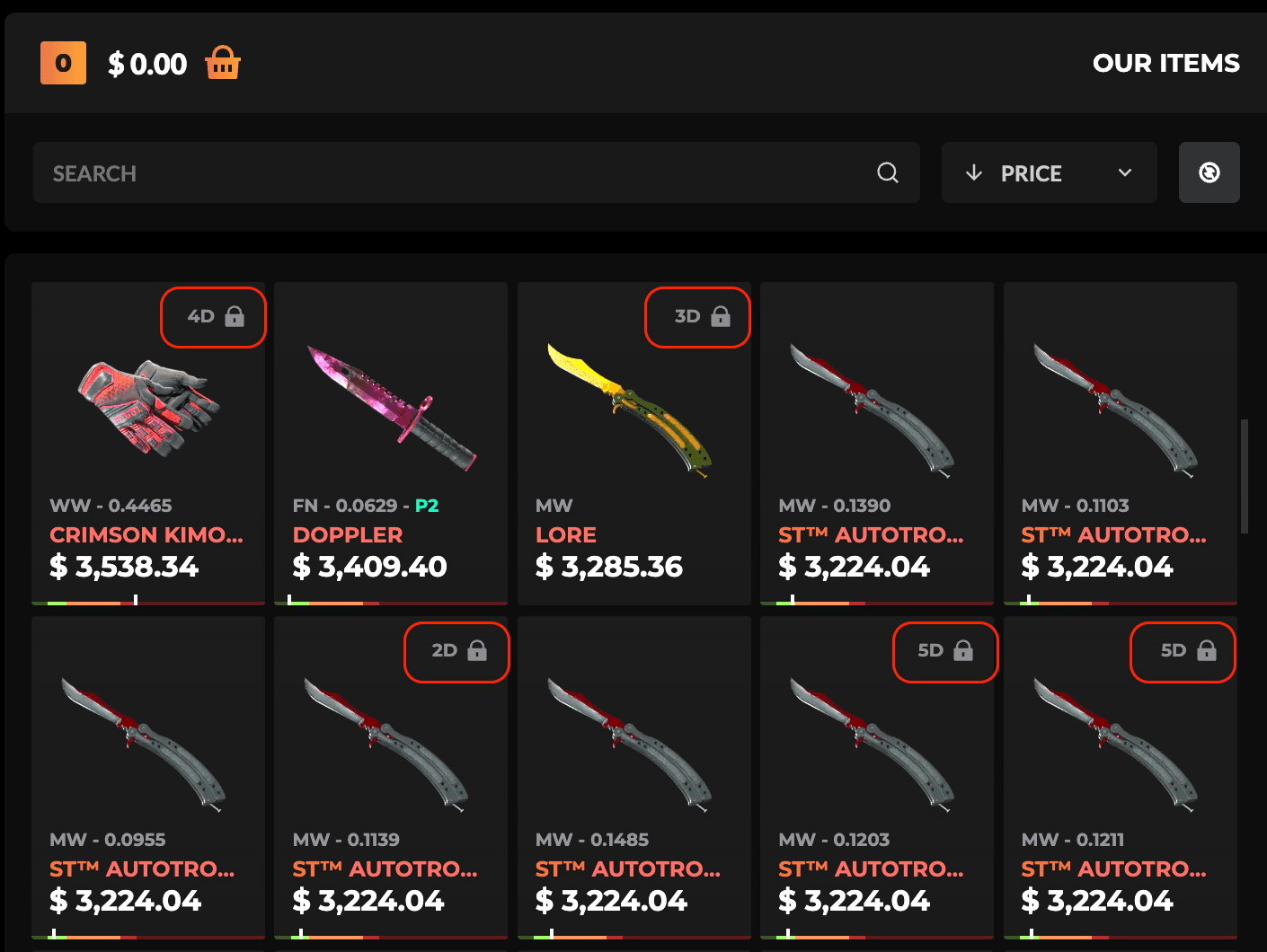\n\nYou can trade for trade-locked items, they’ll just sit in your PirateSwap Equipment until the lock expires—you’ll then be able to claim them to your Steam inventory. ","title":"Where can I see more details about a skin? ","description":"See detailed info about any CS2 skin on PirateSwap! Check float, rarity, and trade lock status with a quick click.","slug":"more-details-about-skin","createdAt":"2025-02-23T11:21:26.170Z","updatedAt":"2025-02-23T11:21:32.607Z","publishedAt":"2025-02-23T11:21:32.599Z","locale":"en","isFeatured":true,"isFrequentlyRead":null,"documentId":"zb30rtym4s9s4dkwevm7fdq0","category":{"id":3,"name":"items","description":"Get details about skins, trade locks, and the Equipment tab on PirateSwap.","createdAt":"2025-02-19T10:55:40.869Z","updatedAt":"2025-02-24T10:26:56.094Z","publishedAt":"2025-02-19T10:55:41.731Z","documentId":"euwz7r0e9swir1u454kk6elp"},"seo":{"id":133,"metaTitle":"Where can I see more details about a skin?","metaDescription":"See detailed info about any CS2 skin on PirateSwap! Check float, rarity, and trade lock status with a quick click.","keywords":"cs2 skins, pirateswap"}},"_nextI18Next":{"initialI18nStore":{"en":{"common":{"404page":{"button":"Back to home","title":"Well, it seems that something went wrong here."},"achievements":"Achievements","achievementToast":{"button":"Claim now!","title":"Arr! \u003cbr/\u003eachivement unlocked!"},"alertBanner":{"botsAvailabilityIssues":"We are currently experiencing temporary technical difficulties that are affecting the availability of some bots. All trades with currently available skins are completely safe and will be executed normally. We assure you that we will come back to you soon with many more available skins."},"back":"Back","backToHome":"Back to home","balanceBadge":{"copy":"up to \u003cstrong\u003e+{{bonus}}%\u003c/strong\u003e","title":"balance"},"blog":"Blog","bonusWidgetTitle":"\u003cGreyText\u003eBonus\u003c/GreyText\u003e","bonusWidgetTitle_second":"\u003cGreyText\u003eBonus\u003c/GreyText\u003e","bonusWidgetTitle_third":"\u003cGreyText\u003eBonus\u003c/GreyText\u003e","Cancelled":"Cancelled","captcha":{"payment":{"description":"Please complete the verification below to continue with your payment."},"title":"Verify you are human"},"claimItemsToast":{"button":"Claim skins","label":"Your trade locked skins \u003ccolor\u003eare ready to claim\u003c/color\u003e"},"claimPscCardsToast":{"button":"Claim cards","label":"Your PSC cards \u003ccolor\u003eare ready to collect\u003c/color\u003e"},"clearAll":"Clear all","close":"Close","contactSupport":"Contact Support","copied":"Copied!","copiedToClipboard":"Copied to clipboard.","create":"Create","description":{"antiScam":"Anti-Scam - Secure trades, verified community safeguards, and full transparency for every user.","blog":"Get the latest CS2 news, tips, and tricks with PirateSwap, the best CS2 trading site in the seven seas! Guides, CS2 skins, events—we cover it all right here. ","exchanger":"Pireateswap Exchanger - Swap CS2 skins instantly. Explore a wide range of CS2 skins now.","helpCenter":"Help Center - Have questions? We’re here to help. Get fast answers from our support team\n","landing":"Instantly sell your CS2 skins for cash or trade them for other skins on PirateSwap, the best CS2 trade bot and skin exchange on the web! Fast and 100% secure."},"error":"Error","Failed":"Failed","FailedNeedManualAction":"FailedNeedManualAction","FailNeedManualAction":"Manual Action","filters":"Filters","follow":"Follow us","freebieRewardModal":{"button":"GO TO EQUIPMENT","reward":"REWARD","subtitle":"YOU GET REWARD","title":"\nCONGRATULATIONS"},"frequentlyAskedQuestions":"Frequently Asked Questions","giveawayToast":{"title":"join ongoing giveaway NOW!"},"home":"Home","InProgress":"In progress","instantSellBalance":"INSTANT SELL BALANCE","instantSellBalanceTooltip":{"description":"Money from your instant sells that's ready to withdraw. Leftover amounts (e.g. from vouchers) and refunded payouts land here automatically."},"invalidEmail":"Invalid email","invalidSteamTradeUrl":"Invalid steam trade url","keywords":{"blog":"cs2 blog","exchanger":"cs2 skins, cs2 skin exchange, cs2 exchanger, instant cs2 swap, pirate swap cs2, trade cs2 skins, cs2 trading platform, swap skins instantly, counter strike 2 marketplace, skin exchanger","landing":"cs2 trading site, sell cs2 skins, cs2 trade bot"},"loading":"Loading","loginWithSteam":"Log in","logout":"Log out","privacyPolicy":"Privacy policy","privacyPolicySubtitle":"A privacy policy is a document that explains how we collect, use, and protect your personal information.\nIt helps you understand what data is gathered when using our application and how it is being used.","promo":{"banner":{"title":"\u003chighlight\u003e+35%\u003c/highlight\u003e refill bonus","tradeWith":"Trade with"},"bwBanner":{"first":"Get \u003ccolor\u003eextra value\u003c/color\u003e for the skins you \u003ccolor\u003esell\u003c/color\u003e and \u003ccolor\u003eexchange\u003c/color\u003e","second":"\u003ccolor\u003e+40% Bonus\u003c/color\u003e to every deposit for a limited time!","third":"Trade with:"},"extra":"\u003cHighlight\u003e35%\u003c/Highlight\u003e extra","forExchanging":"\u003cHighlight\u003efor\u003c/Highlight\u003e exchanging skins","springBanner":{"first":"\u003c1\u003e\u003ccolor\u003eSpring\u003c/color\u003e\u003c/1\u003e\u003cbr /\u003e\u003c2\u003ediscounts\u003c/2\u003e","fourth":"\u003c1\u003e\u003ccolor\u003eUp to $30\u003c/color\u003e\u003c/1\u003e\u003cbr /\u003e\u003c2\u003eFor exchanging skins\u003c/2\u003e","second":"\u003c1\u003e\u003ccolor\u003eGet more\u003c/color\u003e\u003c/1\u003e\u003cbr /\u003e\u003c2\u003efor your skins\u003c/2\u003e","third":"\u003c1\u003e\u003ccolor\u003e35%\u003c/color\u003e extra\u003c/1\u003e\u003cbr /\u003e\u003c2\u003etop up bonus\u003c/2\u003e"},"title":"Promo video","topUpBonus":"Deposit \u003cHighlight\u003ebonus\u003c/Highlight\u003e","upTo":"up to \u003cHighlight\u003e$30\u003c/Highlight\u003e","useCode":"Trade \u003cHighlight\u003ewith:\u003c/Highlight\u003e","wrongCode":"Arr! Check your promocode!","xmasBanner":{"first":"\u003c1\u003eUp to \u003ccolor\u003e$30\u003c/color\u003e\u003c/1\u003e\u003cbr /\u003e\u003c2\u003efor \u003ccolor\u003eexchanging\u003c/color\u003e skins\u003c/2\u003e","second":"\u003c1\u003e\u003ccolor\u003e35%\u003c/color\u003e extra\u003c/1\u003e\u003cbr /\u003e\u003c2\u003eDeposit \u003ccolor\u003ebonus\u003c/color\u003e\u003c/2\u003e","third":"Use:"}},"promocodeBanner":{"claimedState":{"bonus":"bonus","copy":"Your code: \u003c1\u003e{{promocode}}\u003c/1\u003e","header":"Code \u003c1\u003eactivated\u003c/1\u003e"},"editState":{"button":"apply","copy":"If you dont have a promocode, enter \u003c1\u003ePIRATESWAP\u003c/1\u003e","placeholder":"ENTER PROMO CODE"},"emptyState":{"button":"add now","secondaryTitle":"Enter your Promo Code \u003c1 /\u003e and Activate \u003c2\u003e{{bonus}}% Bonus\u003c/2\u003e","title":"promocode"},"error":"Claiming promocode error"},"readMore":"Read more","refundsPolicy":"Refunds policy","refundsPolicySubtitle":"A refunds policy is a document that explains the conditions and procedures for requesting and receiving money back.\nIt outlines when you can request a refund, how the process works, and what timeframes apply to refund requests.","Rollback":"Rollback","save":"Save","search":"Search","sessionExpiredModal":{"button":"Go Back","subtitle":"You will be redirected to the Home page.","title":"Your Session has Expired"},"somethingWentWrong":"Something went wrong","sortBy":"Sort by","springDiscount":"SPRING DISCOUNT","springDiscountModal":{"button":"CHECK PROMOTION","description":"\u003cspan\u003eEnjoy exclusive Spring discounts\u003c/span\u003e on CS2 skins, only on Pirateswap. Grab your favorite items – limited-time offer!","title":"SPRINGS \u003cbr /\u003e\u003cspan\u003eDISCOUNTS\u003c/span\u003e"},"storeBalance":"STORE BALANCE","Success":"Success","support":"Support","termsOfService":"Terms of service","termsOfServiceSubtitle":"Terms of service is a document that outlines the rules, guidelines, and agreements for using our platform.\nIt explains your rights and responsibilities as a user, as well as our obligations as a service provider.","title":{"achievements":"Achievements – Complete Tasks to Get Free CS2 Skins | PirateSwap","affiliate":"Affiliate | PirateSwap – The Best Site to Trade CS2 Skins","antiScam":"Anti-Scam | PirateSwap – The Best Site to Trade CS2 Skins","blog":"PirateSwap Blog – CS2 Skins, Tips \u0026 News | Trade CS2 Skins","comingSoon":"Coming soon! | PirateSwap – The Best Site to Trade CS2 Skins","errorPage404":"404 | PirateSwap – The Best Site to Trade CS2 Skins","exchanger":"Sell CS2 (CS:GO) Skins | Best CS2 (CS:GO) Trading Site! | PirateSwap.com","faq":"FAQ | PirateSwap – The Best Site to Trade CS2 Skins","freebies":"Freebies | PirateSwap – The Best Site to Trade CS2 Skins","helpCenter":"Help center | PirateSwap","instantSell":"Instant Sell – Sell CS2 Skins Instantly for a Profit | PirateSwap","landing":"Sell CS2 (CS:GO) Skins | Best CS2 (CS:GO) Trading Site! | PirateSwap.com","maintenance":"Underrr Maintenance | PirateSwap – The Best Site to Trade CS2 Skins","privacyPolicy":"Privacy Policy | PirateSwap – The Best Site to Trade CS2 Skins","promo":"Promo guide","refundsPolicy":"Refunds Policy | PirateSwap – The Best Site to Trade CS2 Skins","store":"Store | PirateSwap","storeCheckout":"Store checkout | PirateSwap","storeProtrader":"Trade like a PRO | PirateSwap","termsOsService":"Terms of Service | PirateSwap – The Best Site to Trade CS2 Skins","trustedUs":"Trusted Us | Best CS2 (CS:GO) Trading Site! | PirateSwap.com","userProfile":"Your Profile | PirateSwap – The Best Site to Trade CS2 Skins"},"toast":{"success":{"default":{"title":"Success"},"emailChanged":{"description":"Your email address has been saved"},"tradeUrlChanged":{"description":"Your Trade URL has been saved"}},"warning":{"tradeUrlMissing":{"description":"You have to add trade URL to continue exchange","title":"Trade URL is missing"}}},"tradeBonusModal":{"bonus":"Bonus:","description":"It's quite simple really. The more you trade, the larger the bonus. You can see below how the bonus milestones are structured.","title":"How does Bonus work?","trade":"Trade:"},"tradeBonusTable":{"bonus":"Bonus","minimumDeposit":"Minimum deposit","minimumDepositShort":"Min deposit","tab":{"1":{"text":"First"},"2":{"text":"Second"},"3":{"text":"Third"}}},"tradeBonusTooltip":{"1":{"text":"First trade bonus"},"2":{"text":"Second trade bonus"},"3":{"text":"Third trade bonus"},"currentBonus":"Bonus:","currentDeposit":"Deposit:"},"tradeBonusWidget":{"addPromoCode":"\u003cturquoiseBold\u003eAdd the Promo Code\u003c/turquoiseBold\u003e to receive a bonus for your first transaction!","addPromoCodeButton":"Add promocode","addPromoCodeInfo":"Add the Promo Code to receive a bonus for your first transaction!","addPromoCodeLG":"Add the \u003cbold\u003ePromo Code\u003c/bold\u003e to receive a bonus for your first transaction!","allPromoCodesUsed":"You have collected all trade bonuses.","completedButtonText":"Get rewards","completedText":"Hey Pirate! Check your achievements and \u003c1\u003eget rewards!\u003c/1\u003e","congratulations":"Congratulations!","getFree":"Get free $10","text":{"1":{"long":"First Trade Bonus"},"2":{"long":"Second Trade Bonus"},"3":{"long":"Third Trade Bonus"},"activated":"Activated","short":"Trade Bonus"}},"validateCryptoWallet":{"error":"Error validating address","invalidWalletFormat":"Invalid {{name}} address format"},"WaitingForTradeProtected":"In progress","withdraw":{"noEnoughFundsToWithdraw":"No enough funds to withdraw"}},"helpCenter":{"articles":"Articles","banner":{"button":"Support","description":"Our support team is here to help you with any questions \nor concerns you may have","title":"Need more help?"},"browseAllCategories":"All categories","category":{"account":"Account","bonuses":"Bonuses","instantSell":"Instant Sell","security":"Security","topUp":"Account deposit","trading":"Trading"},"foundArticles":"Found articles","frequentlyReadArticles":"Frequently Read Articles","header":{"description":"Need help or have a question? Check out our articles and find the answers you’re looking for!","title":"How can we help?"},"noFoundArticles":{"description":"No articles match your search criteria. Try using different keywords or check for any typos in your search query.","title":"No articles found"},"tickets":{"confirmLeave":{"description":"Your message will be lost if you leave now.","leave":"Leave","stay":"Stay","title":"Discard ticket?"},"contentLabel":"Description","contentPlaceholder":"Describe your issue...","createTicket":"Create Ticket","hasOpenTickets":"You can reopen a ticket once all your other tickets are closed.","imageUpload":{"dragHint":"Drag images here or paste from clipboard (Ctrl+V","invalidType":"Only JPG, PNG, GIF files are allowed","tooLarge":"Image must be under 5MB","tooMany":"Maximum 5 images allowed\n"},"maxOpenTickets":"You can have a maximum of 5 open tickets at a time.","message":"message","messages":"messages","myTickets":"My Tickets\n","new":"New","noTickets":"No tickets yet","noTicketsDescription":"Create a ticket to get help from our support team","pageDescription":"Create and manage your support tickets. Our team will respond as soon as possible.","pageTitle":"Support Tickets","pendingReply":"We're working on it and will respond as soon as possible. \u003cbr/\u003e We usually reply within 15 minutes. \u003cbr/\u003e You can close this window - we'll notify you when we reply.","reopen":"Reopen","status":{"closed":"Closed","open":"Open"},"submit":"Submit Ticket","submitError":"Something went wrong. Please check your input and try again.","submitting":"Submitting...","titleLabel":"Title","titlePlaceholder":"Enter ticket title","topicLabel":"Topic","topicPlaceholder":"Select a topic","typeMessage":"Type a message..."}},"footer":{"account":"Account","community":"Community","company":"Company","copy":"Copyright © 2025 PirateSwap.com\u003cbr /\u003eAll rights reserved","copyright":"Copyright © 2023 PIRATESWAP.COM","discordAriaLabel":"link to discord","exchanger":"Trade skins","exchange":{"text":"Exchange"},"facebookAriaLabel":"link to facebook","faq":{"bonuses":{"description":"\u003cp\u003ePirateSwap structures bonuses around activity, not luck or long wait times. Every new registration unlocks a $30 Trade Bonus, split across a user's first three trades. Each transaction provides a proportional bonus, with the full $30 reached after three qualifying exchanges.\u003c/p\u003e\u003cp\u003ePromo codes such as PIRATESWAP increase every balance top-up by 35%, so a $10 deposit grants $13.50 in usable funds. These codes circulate through affiliate channels and influencer partners, supporting our active trading community.\u003c/p\u003e\u003cp\u003eFreebies offer every trader a chance to get a free CS2 skin each time funds are added to the account or a trade occurs. Users select a Freebie event, fulfill the activity minimum, and receive an outcome on completion. Unlike the restrictive systems on other cs trading sites, PirateSwap releases all bonuses instantly, with full transparency.\u003c/p\u003e\n","note":"Every reward appears in your balance immediately after completion of the qualifying transaction.","table":"\u003ctable\u003e\u003cthead\u003e\u003ctr\u003e\u003cth\u003eBonus\u003c/th\u003e\u003cth\u003eHow to Get\u003c/th\u003e\u003cth\u003eValue\u003c/th\u003e\u003c/tr\u003e\u003c/thead\u003e\u003ctbody\u003e\u003ctr\u003e\u003ctd\u003e$30 Trade Bonus\u003c/td\u003e\u003ctd\u003eRegister, first 3 trades\u003c/td\u003e\u003ctd\u003eUp to $30 across 3 trades\u003c/td\u003e\u003c/tr\u003e\u003ctr\u003e\u003ctd\u003ePromo code (+35%)\u003c/td\u003e\u003ctd\u003eEnter code on top-up\u003c/td\u003e\u003ctd\u003e$10 deposit = $13.50\u003c/td\u003e\u003c/tr\u003e\u003ctr\u003e\u003ctd\u003eFreebies\u003c/td\u003e\u003ctd\u003eEvery deposit/trade\u003c/td\u003e\u003ctd\u003eFree cs2 skin chance\u003c/td\u003e\u003c/tr\u003e\u003c/tbody\u003e\u003c/table\u003e\n","title":"Bonuses Built for Active Traders"},"content":{"description":"At PirateSwap, CS2 traders access fast, fair skin trades completed in just 30 seconds. We operate through Steam login and instant trade URL submission, supporting secure cs2 trade for any inventory size. Every new user receives up to $30 Trade Bonus, with additional value from promo codes like PIRATESWAP and daily Freebies for active trading. Sponsorships with esports teams such as The MongolZ, Imperial Esports, and paiN Gaming place us at the center of the CS2 skin trading scene. Our process includes transparent payouts and 24/7 support, designed to eliminate the typical frustration and delays found on cs trading sites."},"howItWorks":{"description":"Signing up and starting a cs2 trade through PirateSwap requires only a few steps and avoids the usual wait times found elsewhere. Every cs2 trader is guided from Steam sign-in through to instant completion.","list":"\u003col\u003e\u003cli\u003eSign in with Steam on PirateSwap.\u003c/li\u003e\u003cli\u003eAdd your Trade URL and verified email to your account.\u003c/li\u003e\u003cli\u003eEnable Steam Guard on your Steam profile, set inventory to public, and check that no trade lock is active on items you want to trade.\u003c/li\u003e\u003cli\u003eComplete your profile to unlock access to trade cs2 skins with instant results.\u003c/li\u003e\u003cli\u003eBrowse available skins or choose instant sell for your cs2 items.\u003c/li\u003e\u003cli\u003eInitiate your cs2 trade — the process completes in approximately 30 seconds, faster than competitors that typically require several minutes or more.\u003c/li\u003e\u003c/ol\u003e\n","note":"PirateSwap runs 24/7 support for troubleshooting account or trade issues. Unlike most cs trading sites, there is no artificial delay or unnecessary verification loop for approved users. One transaction. Thirty seconds. Result visible immediately.","title":"How PirateSwap Works"},"instantSell":{"description":"\u003cp\u003ePirateSwap gives every user access to instant sell features, turning cs2 skins into cash with no lag. Cash out options operate strictly through gift cards through the sale of your in-inventory skins. Platform balances are designed for trading and selling skins. Only the value obtained from instant skin sales can be withdrawn instantly.\u003c/p\u003e\u003cp\u003eTraders choosing instant sell receive immediate processing, with low fees and no hidden fees deducted on withdrawal. Supported withdrawal methods reflect a global audience, including secure payout methods and gift cards. Each instant payout is transparent, showing the deduction and final received amount at point of request.\u003c/p\u003e\u003cp\u003eExchange operations allow traders of \u003clinkTo\u003ePirateSwap to swap skins\u003c/linkTo\u003e instantly with the cs2 skin trade system, while instant sell strictly turns assets into money. All withdrawals require a Steam Guard-enabled account and a valid trade URL. Issues with trade lock or profile completeness can prevent instant withdrawal but are easily resolved through our Help Center.\u003c/p\u003e\n","title":"Instant Sell and Cash Out Options"},"proScene":{"description":"\u003cp\u003ePirateSwap builds deep ties with the pro CS2 world, supporting teams and broadcasting inventory insights for both avid cs trade users and casual collectors. Sponsorship agreements link PirateSwap with organizations including The MongolZ, Imperial Esports, paiN Gaming, Chinggis Warriors, and MIBR. Our blog section offers up-to-date breakdowns of inventory values for players like those with $700 to $98,000 in skins—covering favorites from AK-47 Gold Arabesque and AWP Dragon Lore to Karambit Gamma Doppler and Butterfly Knife Fade.\u003c/p\u003e\u003cp\u003ePartner content creators span audiences of 163,000 to 2.17 million, from Tiagovski and Izak to Boltz—expanding the reach and authenticity of PirateSwap cs2. PirateSwap holds 4329 reviews, providing social proof and qualitative feedback rated as excellent. CS traders see their skin activity mirrored alongside top pros, reinforcing trust in each trade skins transaction.\u003c/p\u003e\n","title":"Connected to the Pro CS2 Scene"},"questions":{"1":{"answer":"Sign in with Steam, add your Trade URL, complete your profile, and ensure Steam Guard is enabled. Public inventory and no trade lock are required for initial trade cs2 skins.","question":"How can I start a cs2 trade on PirateSwap?"},"2":{"answer":"PirateSwap cannot process cs2 skin trade for items under trade lock. Remove the trade lock to proceed, or select eligible skins for trade.","question":"What if my item has a trade lock during a cs2 skin trade?"},"3":{"answer":"Yes, every user can use instant sell. Items must meet tradability checks and pass Steam Guard verification to be sold for cash.","question":"Does PirateSwap offer instant sell for all cs2 skins?"},"4":{"answer":"PirateSwap charges low fees for both cs2 trade and instant sell options. No hidden fees apply to any withdrawal or payout method.","question":"Are there fees when I trade cs2 skins or use instant sell?"},"5":{"answer":"Only value created through instant sell of your cs2 skins is withdrawable. The process is instant once trade requirements are met.","question":"How do I withdraw funds after an instant sell?"},"6":{"answer":"No, deposited or bonus balance can only be used for cs2 skin trade or Store purchases. Cash out applies to proceeds from selling your own skins.","question":"Can I withdraw the balance added via deposit or promo code?"},"7":{"answer":"Register and complete up to three qualifying trades. The Trade Bonus applies automatically, payout up to $30.","question":"How do I get the $30 Trade Bonus?"},"8":{"answer":"Input codes such as PIRATESWAP during balance refill. Each code gives up to 35% extra on deposit amount for trade skins cs2.","question":"Where can I enter a promo code for a top-up?"},"9":{"answer":"Most CS2 skins traded on PirateSwap are eligible—StatTrak, knives, gloves, and special editions. Examine item status and Steam Guard on your Steam account before trading.","question":"What skins qualify for cs2 trade and instant sell?"},"10":{"answer":"Access Terms of Service, Privacy Policy, and Refunds Policy via Help Center. The cs trading site discloses all terms, requirements, and contact details.","question":"Where do I find rules and privacy information?"},"11":{"answer":"PirateSwap sponsors The MongolZ, Imperial Esports, paiN Gaming, Chinggis Warriors, and MIBR. Blog and Store sections showcase pro player inventories and skin trends for cs2 trading.","question":"Who are PirateSwap's esports partners?"}},"questionsTitle":"FAQ","sections":{"description":"PirateSwap cs2 covers all major trading needs through six dedicated sections, each accessible from the site menu. Users find dedicated support and tools for every trading goal.","list":"\u003cul\u003e\u003cli\u003e\u003clinkTo\u003ePirateSwap Store\u003c/linkTo\u003e: A catalog of thousands of CS2 skins, StatTrak models, knives, gloves, rare items like AWP Crakow and Nova Koi.\u003c/li\u003e\u003cli\u003e\u003cstrong\u003eExchanger:\u003c/strong\u003e Instant trade for cs2 traders eliminates manual offers and speeds up each deal.\u003c/li\u003e\u003cli\u003e\u003cstrong\u003eFreebies:\u003c/strong\u003e Ongoing events to win free cs2 skins with activity-based entry requirements.\u003c/li\u003e\u003cli\u003e\u003cstrong\u003eBlog:\u003c/strong\u003e Articles on pro teams, player inventories, collecting trends, and the technical side of skin values.\u003c/li\u003e\u003cli\u003e\u003cstrong\u003eHelp Center:\u003c/strong\u003e Resources on trade bonus, transaction support, payout troubleshooting, Steam security, policy documentation, and transaction history.\u003c/li\u003e\u003cli\u003e\u003cstrong\u003eTrusted Creators:\u003c/strong\u003e A roster of verified influencers and guides to maximize value when trading CS2 skins and following the latest CS2 trading events.\u003c/li\u003e\u003c/ul\u003e\n","note":"Each section targets a specific step in the cs2 skin trade journey, ensuring pirateSwap cs2 functions as a comprehensive hub rather than a single-purpose cs trading site.","title":"Explore PirateSwap Sections"},"security":{"description":"\u003cp\u003ePirateSwap operates as a legally registered business under IT MARKET BG, 24 Morska Sirena St., fl. 10, apt.58, Varna, Bulgaria. All users must be at least 18 years old and agree to the Terms of Service, Privacy Policy, and Refunds Policy before initiating cs trades.\u003c/p\u003e\u003cp\u003eTransactions use secure connections, with external companies managing all payment processing to reduce fraud risks. Every trade and payout is governed by legally binding terms, with clear recourse for refunds or dispute resolution. The cs trading site maintains a review base of 3783, with support staff available for troubleshooting trade, KYC, or payment issues.\u003c/p\u003e\u003cp\u003eUser privacy remains protected. Compliance is achieved via mandatory documentation for payments where required, and all policies are publicly viewable.\u003c/p\u003e","title":"Security and Clear Rules"}},"freebies":"Freebies","helpCenter":"Help center","instagramAriaLabel":"link to instagram","instantSell":"Instant sell","mainHeader":"\u003c1\u003eNo.1 CS2\u003c/1\u003e\u003c2 /\u003eskins changer \u003c3 /\u003e online","owned":"PirateSwap is owned and operated by MESSIDOR LTD. \u003cbr /\u003ePayments and other services may be provided by external companies. Contact us via help@pirateswap.com.","ownedBy":"Pirate Swap is owned and operated by MESSIDOR LTD","ownedNew":"PirateSwap is owned and operated by: \u003cbr /\u003e\nIT MARKET BG, 24 Morska Sirena S,t. fl. 10, apt.58, 9000 Varna, Bulgaria\n\u003cbr /\u003e\n\u003cbr /\u003e\nPayments and other services may be provided by external companies. Contact us via help@pirateswap.com.\n","pirateSwap":"PirateSwap","privacyPolicy":"Privacy Policy","rights":"All rights reserved 2023","rightsReserved":"All Rights Reserved","sell":"Sell","steamCommunityAriaLabel":"link to steam community","support":"Support","termsAndConditions":"Terms and Conditions","twitterAriaLabel":"link to X (twitter)","userAccount":"User account"},"header":{"achievements":"Achievements","affiliate":"Affiliate","antiScam":"Anti-Scam","balanceBadge":{"storeBalance":"Store balance","totalBalance":"Total balance"},"exchanger":"Exchanger","followUs":"Follow us:","freebies":"Freebies","getBonus":{"long":"Get free $10","short":"Free $10"},"giveaways":"Giveaways","helpCenter":"Help center","instantSell":"Instant sell","loginViaSteam":"Sign in via steam","logoAriaLabel":"link to homepage","logout":"Logout","privacyPolicy":"Privacy Policy","promo":"Brief","promoCodeActivated":{"desc":"When you deposit $30 you will get \u003ccolor\u003e$40.5\u003c/color\u003e instead!","title":"\u003ccolor\u003e35%\u003c/color\u003e Promo code activated"},"refundsPolicy":"Refunds Policy","sell":{"long":"Instant Sell","short":"Sell"},"store":"Store","support":"Support","termsOfService":"Terms of Service","trade":{"long":"Trade Skins","short":"Trade"},"trustedUs":"Trusted us","userAccount":"User account","welcomePhrase":"Ahoy Pirate!","wiki":"Wiki"},"modals":{"blackWeek":{"button":"get black week bonus","disclaimer":"The Black Friday bonus cannot be combined with the other bonus.","paragraphOne":"\u003ccolor\u003eGet extra value for the skins\u003c/color\u003e you sell and exchange \non PirateSwap!","paragraphTwo":"Plus, a \u003ccolor\u003e40% Bonus\u003c/color\u003e to every deposit for a limited time!"},"claimItem":"Claim item","claimItemDesc":"This will initiate a secure trade, during which we will deliver this skin to you.","claimItemTitle":"Ready to claim your item?","downloadAvatar":"Download avatar","goBack":"Go back","skinDetails":{"add":"Add","addToCard":"Add to cart","addToTrade":"Add to trade","claimItem":"Claim","collection":"Collection","description":{"agent":"Added to Counter-Strike in 2019, Agent skins allow you to change your player model to a wholly different character. Some Agents also change the radio voice your character is speaking with, making the change even more fun. Agents come in 4 rarities: Distinguished, Exceptional, Superior, and Master.","ak-47":"Perhaps the most iconic rifle in both Counter-Strike and real-life, the AK (Avtomat Kalashnikova, Kalashnikov’s Automatic) has been in production since 1949, making it Counter-Strike’s oldest weapon. This classic gun is the most popular rifle for the terrorists, due to its one-hit headshot kills, despite it's rather big recoil.","aug":"Designed in the 1960s and launched in 1978 by Steyr-Daimler-Puch, the AUG is the weapon of choice for the Austrian Armed Forces, owing to its bullpup design. In-game it's a powerful rifle choice due to its scope and damage output, although its high price may sour some on it.","awp":"The British Accuracy International Arctic Warfare sniper rifle has been in production since 1982, although some argue the variant in game is the AWM and not AWP. The weapon is an iconic part of Counter-Strike, given that it's a one-shot kill to the torso or head, regardless of armor, making it the third most popular rifle behind the AK and M4s.","bayonet":"The Bayonet is actually based on the M9M4 Bayonet, a knife typically designed to be attached to the barrel of a rifle. Knives in Counter-Strike are cosmetic only and do not change the damage dealt by the weapon in any way.","bloodhound-gloves":"Bloodhound Gloves are armored gloves with a ferocious design, featuring metal plating and aggressive motifs. Inspired by the Bloodhound faction in Counter-Strike, these gloves are meant to intimidate. In the game, Bloodhound Gloves are a cosmetic choice, adding flair without affecting gameplay mechanics.","bowie-knife":"The Bowie Knife is a large, fixed-blade knife named after the American frontiersman Jim Bowie. Known for its strength and versatility, it’s a favorite for heavy-duty tasks. In Counter-Strike, the Bowie Knife is a cosmetic choice and does not impact the damage dealt by the weapon.","butterfly-knife":"The Butterfly Knife, also known as a balisong, features a unique folding blade mechanism, allowing for flashy opening and closing animations. Originating from the Philippines, this knife is both a tool and a weapon. In Counter-Strike, it offers no gameplay advantage beyond its aesthetic appeal, as all knives deal the same damage.","classic-knife":"The Classic Knife is a timeless design, reminiscent of the standard issue knife in earlier versions of Counter-Strike. It’s straightforward, reliable, and iconic. In Counter-Strike, the Classic Knife is a nostalgic cosmetic option, with no effect on the weapon’s damage output or stats.","container":"Cases in Counter-Strike are virtual containers that hold a variety of cosmetic items, such as weapon skins, gloves, or knives. Each case offers a randomized selection of items, ranging from common to extremely rare.","cz75-auto":"The CZ75-Auto is a modified version of the Czech CZ75 coming from Ceska Zbrojovka, the former national arms manufacturer of Czechia. This is the only automatic pistol in Counter-Strike, with a ridiculous fire rate, matched only by its recoil, making it a extremely dangerous weapon when mastered.","desert-eagle":"Designed by Magnum Research and Israel Military Industries, the real-life Desert Eagle has been around since 1983, having undergone some small changes since. In-game, this $700 gun is a beast, killing with a single headshot regardless of your opponent's armor. The downside? If you miss one shot, you're probably missing them all courtesy of it's powerful kick.","driver-gloves":"Driver Gloves offer a sleek, high-end design inspired by old-school racing gloves, providing excellent grip and control behind the wheel. Their leather construction and meticulous stitching reflect luxury and performance. In Counter-Strike, Driver Gloves are purely cosmetic, with no impact on game mechanics.","dual-berettas":"The Dual Berettas are inspired by the Beretta 92 manufactured in Italy. The idea to make them dual wielded stems from their use as dual-wielded pistols in John Woo’s classic Hong Kong action movies like Hard Boiled. In-game, they're most useful during pistol rounds due to their low armor penetration.","falchion-knife":"The Falchion Knife is inspired by medieval European swords, featuring a slightly curved blade that combines elements of both a knife and a sword. Its historical design is purely aesthetic in Counter-Strike, as it does not change the damage dealt by the weapon in any way.","famas":"Created in 1978, the FAMAS stands for Fusil d'Assaut de la Manufacture d'Armes de Saint-Étienne. It's a cheaper and lower-damage rifle than the M4s, but effective during force buys and anti-ecos nevertheless.","five-seven":"Produced by FN Herstal in Belgium, the real life version of this weapon has actually been developed in conjunction with another CS2 gun in the P90. A great choice for force buys, the gun packs a far bigger punch than you'd expect.","flip-knife":"The Flip Knife is a modern tactical blade with a fast-deploying, spring-loaded mechanism. Its sleek design is favored by many for its compact size and swift action. Despite its practical look, in Counter-Strike, it’s purely cosmetic and does not affect the damage output or any other stats.\n","g3sg1":"Created by Heckler \u0026 Koch in 1959, this weapon is the sharpshooter variant of the G3 assault rifle. In-game, the autosniper is a powerful, yet expensive weapon. Great for casual play, it's easily nullified by a consistent AWPer due to its lower damage output to the torso.","galil-ar":"A Israel Military Industries creation, named after designer Yisrael Galili, the weapon has been in use since 1972 and is still in use by the Israel Defence Force. Its design can be traced back to the AK-47, which is fitting given that in-game, the Galil is essentially a weaker version of the Russian rifle, providing less damage for a lower price.","glock-18":"One of the most popular pistols in the world, the Glock-18 is manufactured in Austria and has been used by militaries and law enforcement (as well as gangs) all over the world ever since 1982. It's the default pistol on the T-Side. Only really useful during the first round of either half.","gut-knife":"The Gut Knife features a hook on the spine of the blade, originally intended for field dressing game. This rugged design is popular among hunters and survivalists. In Counter-Strike, the Gut Knife’s unique look adds style to your loadout but does not alter the weapon’s damage or functionality.","hand-wraps":"Hand Wraps are rugged, makeshift gloves made from strips of fabric, typically used in combat sports or by soldiers in the field. They provide protection and grip while maintaining flexibility. In Counter-Strike, Hand Wraps offer a rough, tactical look, but remain cosmetic and do not affect gameplay.","huntsman-knife":"The Huntsman Knife is a rugged combat knife designed for outdoor use, featuring a wide blade suitable for both chopping and slicing. Its robust design makes it popular among survivalists. In Counter-Strike, the Huntsman Knife is purely cosmetic, offering no gameplay advantages.","hydra-gloves":"Hydra Gloves feature a unique, aggressive design with intricate patterns and high-quality materials. Named after the mythical beast, these gloves are as stylish as they are functional. In Counter-Strike, Hydra Gloves are cosmetic only, providing a distinct look without changing gameplay dynamics.","karambit":"The Karambit is an exotic knife inspired by Southeast Asian martial arts, featuring a curved blade designed for slicing and ripping. In Counter-Strike, it’s known for its intimidating appearance and fluid animation. Knives in Counter-Strike are purely cosmetic, so the Karambit does not alter the damage dealt by the weapon in any way.\n","m249":"This weapon introduced in 1984 is an adaptation of the FN Herstal’s LMG, the FN Minimi (what a name!) created for the US Armed Forces. In-game, it's rarely used to due its slow movement speed and prohibitive cost, making it more of a meme weapon than an actual gun.","m4a1-s":"Despite its name, this M4 is actually based on the M16A1, the previous combat rifle of the US military. The silenced version has a slower fire rate and smaller magazine than the M4A4, but more than makes up for it with its lower recoil, higher accuracy, and silencer.","m4a4":"The M4A4 is actually a fictional variant of the Colt M4 that has been used by the US military for the last 30+ years. A bit less popular in Counter-Strike than the M4A1-S due to its higher price and lower accuracy. However, with a bigger magazine and faster fire rate, it's certainly a good choice when fighting up close.","m9-bayonet":"The M9 Bayonet is a modern variant of the M9M4 Bayonet with a serrated blade, designed to be attached to the barrel of a rifle. Knives in Counter-Strike are cosmetic only and do not change the damage dealt by the weapon in any way.","mac-10":"While it may look like it’s a pretty modern gun, this one is actually one of the oldest guns in Counter-Strike when it comes to real-life, having been made since 1970 by the Military Armament Corporation, and has even seen action in the Vietnam War. In-game, it's a very popular choice on anti-ecos, as it's extremely effective against unarmored opponents.","mag-7":"Created by South African Techno Arms, the MAG-7 is a pump action shotgun in production since 1995. It was designed for close quarters combat, with a civilian version also being made, featuring a non-detachable wooden stock. In-game, it's known for its massive damage output, making it great for combat in tight spaces.","moto-gloves":"Moto Gloves are heavily padded, durable gloves designed for motorcyclists. They feature reinforced knuckles and palms for added protection and grip during high-speed rides. In Counter-Strike, Moto Gloves add a tough, aggressive aesthetic to your character but do not alter gameplay or weapon stats.","mp5-sd":"Designed by Heckler \u0026 Koch, the MP5-SD is a variant of a weapon that has been around since 1966. The silenced SMG used to be a swap for the MP7 and is generally considered inferior to it due to its slower firing rate, however, some players swear by it.","mp7":"The MP7, created by Heckler \u0026 Koch for NATO clients in 2001 was designed to penetrate soft body armor. In-game, it's the best SMG to use against armored opponents, making it a frequent purchase on force buy rounds.","mp9":"Designed by Brügger \u0026 Thomet in 2001, the MP9 is an evolution of the Steyr TMP—the weapon it replaced in Counter-Strike. In-game, the weapon is best used on anti-eco rounds given its performance against unarmored opponents.","music-kit":"In the game since October 2014, Music Kits allow you to customize the sound heard by your opponents whenever you win MVP in the game. Featuring a collection of different songs from various artists, Music Kits are a fun way to express yourself in Counter-Strike 2.","navaja-knife":"The Navaja Knife, inspired by traditional Spanish folding knives, features an elegant, curved blade. Originally used for both utility and self-defense, it’s a blend of history and craftsmanship. In Counter-Strike, the Navaja Knife’s unique design is purely cosmetic, with no impact on weapon stats or damage.","negev":"Designed by Israel Weapon Industries and named after the Negev desert, the Negev is in production since 1995, and we must say this clearly, IS NOT ACTUALLY A SUPER-PRECISE LASER GUN IN REAL-LIFE. It is one in Counter-Strike, however. Unplayable on the pro level, really fun for PUGs... if you know how to use it.","nomad-knife":"The Nomad Knife is a robust, versatile tool designed for survival and utility in harsh environments. With a thick, sturdy blade and ergonomic handle, it’s built for durability and reliability in the wild. In Counter-Strike, the Nomad Knife adds a rugged, tactical aesthetic to your character, but remains purely cosmetic, with no effect on gameplay mechanics or weapon damage.","nova":"Developed by Italian Benelli, this Italian shotgun has been in production since the 1990s, with its primary use being hunting and self-defense. In-game it's a very accurate shotgun, with instant headshot damage against unarmored opponents, however, given it's low firing rate and price, it's not the most popular option.","p2000":"Designed by German Heckler \u0026 Koch, the P2000 was created in the early 2000s for the German Customs Organization, fittingly enough, as a successor to the USP, as the agency needed a more compact pistol. Ironically enough, despite being the default CT pistol in-game for years, it's far less popular than the USP.","p250":"Designed by SIG arms and launched in 2007, the P250 is one of the newest weapons in CS2. At $300 in-game, and the ability to dispose of armored opponents with a couple headshots, this weapon is versatile and popular, especially on force buys and as a sidearm for AWPers. ","p90":"Created by the Belgian FN Herstal along with the Five-seveN, it actually uses the same ammunition as the pistol. This SMG is popular among newer players due to its high running accuracy and damage output, however, better players usually avoid it given its high price and low kill reward.","paracord-knife":"The Paracord Knife features a simple, sturdy design with a paracord-wrapped handle, making it both practical and durable in survival situations. In Counter-Strike, it’s another cosmetic option that does not impact the gameplay or damage dealt by the weapon.","pp-bizon":"Created by Victor Kalashnikov and Alexei Dragunov (both sons of famous gun designers) in 1993 with a unique helical magazine. In-game, it's mostly an anti-eco tool, given its one-hit headshot potential against unarmored opponents.","r8-revolver":"The Smith \u0026 Wesson 327 R8, this model is a modernized version of a classic revolver. The original model has been in production since 1935, with the new models appearing in the 2000s. A niche weapon in Counter-Strike due to its awkward firing model, it's basically a Deagle with input lag and an unreliable secondary fire option.","sawed-off":"The weapon has been inspired by the Remington 870 (or, as the engraving says, the Relphington 808), with the barrell shortened with a saw. This weapon is rarely used in-game as despite high damage, it's not overly popular due to its short range and slow movement speed.","scar-20":"Designed by FN Herstal, the 20 is the sharpshooting variant of the 2004 rifle. In-game, the autosniper is a powerful, yet expensive weapon. Great for casual play, it's easily nullified by a consistent AWPer due to its lower damage output to the torso.","sg-553":"Designed by the Swiss Schweizerische Industrie Gesellschaft (SIG) in the 90s, the SG 553 (standing for Sturmgewehr - assault rifle) is a variant of the SG 550 that was released in 2008. In-game the \"Krieg\" is a powerful one-hit headshot scoped beast. Firing a bit slower than the AK-47, and with a higher price tag, it's not the first choice, but nevertheless a good choice for the Ts.","shadow-daggers":"The Shadow Daggers consist of a pair of small, easily concealable blades designed for rapid, close-quarters combat. Their distinctive dual-wielded style is eye-catching, but in Counter-Strike, they are purely cosmetic and do not affect the damage output or any other gameplay aspects.","skeleton-knife":"The Skeleton Knife is a lightweight, minimalist blade with an open-handle design, making it both portable and efficient. Its modern, tactical design is eye-catching, but in Counter-Strike, it serves only as a cosmetic choice and does not change the weapon’s damage or performance.","specialist-gloves":"Specialist Gloves are high-performance tactical gloves, often used by military and law enforcement personnel. These gloves are designed for maximum dexterity and protection in combat scenarios. In Counter-Strike, Specialist Gloves are purely cosmetic, offering no gameplay advantages.","sport-gloves":"Sport Gloves are designed for agility and grip, typically used in activities like motorcycling or extreme sports. Their lightweight materials and reinforced padding provide both comfort and protection. In Counter-Strike, Sport Gloves are a cosmetic upgrade that add style to your loadout without affecting gameplay.","ssg-08":"Produced by Steyr in 2008, this sniper rifle featuring .308 Winchester rounds is the newest weapoin in Counter-Strike. In-game it's a \"baby-AWP\" capable of insta-kills only with headshots, but making up for it with a lower price and higher movement speed. A good sniper can change a round using the SSG.","sticker":"Stickers in Counter-Strike are decorative decals that players can apply to their weapons, adding a personal touch or showing support for teams and events. Stickers come in various designs, including team logos, custom artwork, and special event themes. Like other cosmetic items, stickers do not influence gameplay but offer players a way to express their style or fandom. Once applied, they cannot be traded and remain on the weapon until scratched off.","stiletto-knife":"The Stiletto Knife is a slender, pointed blade originally designed for thrusting attacks. Its narrow profile and sleek appearance make it a stylish choice. In Counter-Strike, the Stiletto Knife is purely cosmetic, offering no changes to the damage or performance of the weapon.","survival-knife":"The Survival Knife is designed for extreme situations, featuring a durable, all-purpose blade that can handle a variety of tasks in survival scenarios. Its no-nonsense design emphasizes practicality over flash. In Counter-Strike, the Survival Knife provides a tough, utilitarian look to your loadout while remaining a cosmetic choice that does not impact gameplay or damage output.","talon-knife":"The Talon Knife is inspired by the Karambit, featuring a curved blade that mimics the shape of a claw. This knife is designed for slashing and close-combat scenarios. In Counter-Strike, the Talon Knife’s fierce design is purely for looks, as it does not alter the damage or any other aspects of gameplay.","tec-9":"Developed by Swedish-American Intratec, the Tec-9 is a weapon that’s mostly associated with American gangs because of its relatively low price and high fire rate. In Counter-Strike its high movement accuracy when moving forward makes it a popular choice for force rounds.","title":"Description","ump-45":"Designed by Heckler \u0026 Koch to be the successor to the MP5, the UMP-45 holds .45 ACP cartridges. Once the most powerful SMG in Counter-Strike, a series of nerfs made it very situational, with high damage in close-quarters and big damage falloff.","ursus-knife":"The Ursus Knife is a modern tactical knife with a practical design, featuring a slightly curved blade ideal for slicing. Its ergonomic grip and balanced blade make it a reliable tool in real-life scenarios. In Counter-Strike, it serves only as a cosmetic feature, without affecting gameplay or damage.\n","usp-s":"Designed by Heckler \u0026 Koch, the USP has been in service since 1993 as a weapon to be used by law enforcement. In Counter-Strike, it's silenced version is the most popular CT starter pistol due to its accuracy and stealth.","xm1014":"Designed in Italy, the XM1014 was actually originally named the Benelli M4, however, the US military designated it as an experimental weapon (hence the X), before eventually dropping the letter, meaning that in real-life the XM1014 is actually the M1014. It's perhaps the most popular shotgun in game given its automatic fire function allowing you to cause massive damage to multiple enemies."},"finish":"Finish","float":"Float","inspectInGame":"Inspect in game","paintIndex":"Paint index","paintSeed":"Paint seed","paintSeedDescription":"The paint seed determines the exact pattern of the paint on a given item.","rarity":"Rarity","removeFromTrade":"Remove item","stickers":"Stickers","summary":"Summary"}},"addPromocodeModal":{"back":"Back","bonusActivated":"Bonus activated","bottomText":"How does the promo code work?","claimingError":"Error during claiming","claimingSuccess":"Promocode claimed!","getBonus":{"button":"Claim your bonus","description":"Enter your favourite creator's code below and begin trading your items.","inputPlaceholder":"Enter code","promoCodeInfo":"Don’t have a code? \u003ccolor\u003eUse code\u003c/color\u003e","title":"Claim your Free $10 Bonus"},"header":"Get your \u003c1 /\u003e $30 bonus","howItWorks":"How it works?","howItWorksDescription":"The more you exchange, the bigger the bonus you will receive. You will get a bonus for each of your first three trades","howItWorksHeader":"How it works:","promoCodeInfoText":"Dont have a code? Use:","promocodeInputPlaceholder":"Your promocode","savePromocode":"Save promocode","secondaryHeader":"To get a bonus of up to $30, use the code from your favorite creator!"},"exchanger":{"addItem":"Select","addToTrade":"Select","addVoucher":"Add voucher","allExchangerItemsWillBeRemoved":"All items in the \"You get\" list will be removed","allUserItemsWillBeRemoved":"All items in the \"Your offer\" list will be removed","amount":"Amount","antiScam":"anti-scam","areYouSure":"Are you sure?","balanceCard":{"addFunds":"Add funds","afterTrade":"After trade","balance":"Balance","bonus":"bonus","button":"Add funds","openBalanceHistoryModal":"Open balance history modal","primaryText":"Increase balance","primaryTextShort":"Deposit","secondaryText":"up to {{bonus}}%","totalAmount":"Total amount","totalBalance":"Total balance","yourBalance":"your balance","yourItems":"your items"},"balanceHistoryModal":{"errorMessage":"We can’t find a match for what you’re looking for."},"balanceModal":{"amount":{"bonus":"bonus","header":"the amount","inputLabel":"payment amount","summary":"you will get"},"backToHome":"Go Back","button":"complete purchase","comingSoon":"Coming soon...","giftcards":{"apply":"apply","error":"Wrong code","giftcardTitle":"GIFTCARD","header":"enter giftcard","inputLabel":"do you already have a code?","inputPlaceholder":"Enter the giftcard code here","redeemError":"something went wrong during code claim"},"header":"refill balance","paymentDetails":{"date":"Date:","label":"Payment details","paymentMethod":"Payment method:","paymentStatus":"Payment status:","success":"Success","transactionId":"Transaction ID:"},"paymentMethods":{"header":"methods","secondaryHeader":"Select a payment method:","tabs":{"cards":"Cards","crypto":"Cryptocurrencies","eWallet":"E-Wallet","giftcards":"Giftcards","top":"Top"},"terms":"By proceeding to checkout you agree to our \u003c1\u003eTerms of Service\u003c/1\u003e, \u003c2\u003ePrivacy Policy\u003c/2\u003e and \u003c3\u003eRefund Policy\u003c/3\u003e."},"promoCode":{"banner":"Enter your Promo Code and Activate the bonus.","button":"claim","claimed":"claimed","header":"use promocode","placeholder":"Enter promocode"},"status":{"message":{"failed":"Something went wrong","success":"Your funds will soon appear in your balance. Enjoy!"},"title":{"failed":"Transaction UnSuccessful!","loading":"Processing...","success":"Transaction Successful!"}}},"basket":{"empty":{"left":{"description":"Add the items you want to trade","title":"Your Offer"},"right":{"description":"Choose the items you would like to receive","title":"You Receive"}},"mobileModal":{"title":"Cart"}},"cancel":"Cancel","categoryFilter":{"all":"See all","label":{"agents":"Agents","charms":"Charms","gloves":"Gloves","heavy":"Heavy","knives":"Knives","pin":"Pins","pistols":"Pistols","rifles":"Rifles","smg":"Smg","snipers":"Sniper Rifles","sticker":"Stickers"}},"chevron":"chevron","claim":"Claim","clear":"Clear","clearBasket":"Clear cart","coin":"coin","confirmTrade":"Confirm trade","confirmTrades":"You must now confirm all trades","csLogo":"counter strike logo","date":"Date","dateFrom":"Date from","dateTo":"Date to","error":{"rateLimitExceeded":"Rate limit exceeded"},"exchangeCheckout":"Exchange checkout","exchangeHub":{"connectionWarningDescription":"Information about exchange statuses may arrive with a delay.","connectionWarningTitle":"There is an issue with updating exchanges."},"exchangeId":"Exchange ID","exchangeModal":{"acceptance":"Select the acceptance method","acceptanceButtonSteam":"Accept via steam","acceptanceButtonWeb":"via steam web","accepted":"Accepted","acceptedTrades":"Accepted trades","acceptOffers":"Accept previous offers first","allConfirmed":"All Confirmed","botLevel":"LEVEL","botRegisteredAt":"REGISTRATION","chickenAlt":"Chicken with pirate telescope","clickHere":"Click here:","confirm":"Confirm","errorOccured":"Error occured","exchangeCompleted":{"title":"\u003ccolor\u003eCongratulations!\u003c/color\u003e Your exchange is now completed!"},"finalizationLoader":"Finalization of the order","fold":"Fold list","incoming":"Incoming","instantSellPSCSuccess":{"subtitle":"Your codes will be sent to your email and appear in your transaction history in the profile."},"instantSellSuccess":{"cryptoRateDisclaimer":"This amount may differ from the final payout depending on the {{code}} exchange rate at the time of payment.","payoutDetails":"Payout details","subtitle":"Your funds will be sent automatically once Steam's Trade Protection period ends.","title":"Transaction Successful!"},"kycCongratulations":"Congratulations!","kycContinue":"Continue KYC","kycDescription":"Just one thing before you continue sailing. \u003cbold\u003eWe must confirm your identity.\u003c/bold\u003e To start our KYC procedure and continue trading, please contact our support team.","kycRequiredDescription":"\u003cHighlight\u003eThe whole PirateSwap world has heard of you!\u003c/Highlight\u003e\n\nJust one thing before you continue sailing. We must confirm your identity. To start our KYC procedure and continue trading, please contact our support team.","kycSubtitle":"The whole PirateSwap world has heard of you!","limitExceeded":"Congratulations!","limitExceededContactUs":"Contact our support team to receive your bonus and unlock the ability to continue trading!","limitExceededDesc":"Before you make your next trade, we have a special reward for your dedication.","limitExceededDescription":"\u003cHighlight\u003eYou've become one of the most notorious traders on the Seven Seas!\u003c/Highlight\u003e\n\nBefore you make your next trade, we have a special reward for your dedication. Contact our support team to receive your bonus and unlock the ability to continue trading! ","limitExceededSubtitle":"You've become one of the most notorious traders on the Seven Seas!","notAllConfirmed":"Not all confirmed","offerList":"Offer list","offerStatusDoesntChange":"Offer status doesn't change?","outgoing":"Outgoing","outgoingTrades":"Completed trades","outGoingTrades":"Outgoing trades:","preparing":"Preparing the offer","preparingPayout":"Preparing the payout","preparingPlural":"Preparing the offers","privateInventoryDesc":"You must switch your Steam profile to public","rejected":"Rejected","retryButtonText":"Retry","somethingWentWrong":"Something went wrong","subtitle":"You must now confirm all trades","temporaryExchangeBlockDesc":"You haven’t accepted all outgoing trades. You will receive the difference between your deposit and withdrawal in the form of balance.","title":"Exchange checkout","trade":"Trade","tradelock":"Tradelock","tradeNotAccepted":"Trade not accepted","unfold":"Unfold list"},"failedClaimItems":{"refund":"Refund","temporaryUnavailable":{"description":"The bot is temporarily unavailable and cannot withdraw your skins. Please try again later."},"unavailable":{"description":"Unfortunately, we are unable to withdraw some of your skins due to a skin rollback / bot ban. You can exchange the skins for others or receive a refund to your balance."}},"filters":{"addFilter":"add filter","affordableItems":"Affordable items","clearAll":"Clear all","collection":{"label":"Collection"},"collections":{"notFound":"No collections found"},"color":"Color","dayCounter_one":"{{count}} day","dayCounter_other":"{{count}} days","exterior":"Exterior","freebieMaxBalanceLimit":"To balance limit","label":"Filters","lock":{"description_other":"less than {{count}} days locked","description_one":"less than {{count}} day locked","label":"Tradelock","tradable":"Tradable"},"noTradelock":"No trade lock","onlyTradelocked":"Trade locked","pattern":{"label":"Pattern","numberAlreadyExists":"This number already exists","numberOutOfRange":"Number should be between 1-1000","placeholder":"Eg. 661"},"price":{"error":"Invalid range","label":"Price range","short":"Price"},"rarity":"Rarity","resetFilters":"Reset filters","souvenir":"Souvenir","stackedView":"Stacked view","stattrak":"Stattrak™","stickers":{"gunStickers":"Gun stickers","label":"Stickers","notFound":"No stickers found","search":"SEARCH","slots":"Slots"},"tradable":"Tradable","tradelock":"Tradelock","tradelockAlert":"Skins from the exchange will go into your inventory as soon as their blockade has passed.","type":{"assaultRifles":"Assault Rifles","gloves":"Gloves","knives":"Knives","label":"Type","machineGuns":"Machine Guns","other":"Other","pistols":"Pistols","shotguns":"Shotguns","smgs":"Smgs","sniperRifles":"Sniper Rifles"},"withKeychain":"Item with keychain","withoutTradeLock":"Without trade lock","withSticker":"Item with sticker"},"from":"from","getFreebieCard":{"info":"Complete the transaction for a chance to \u003cspan\u003eGet a Free Skin!\u003c/span\u003e","missingAmount":{"description":"\u003cspan\u003eAdd just \u003cprice/\u003e more to your trade\u003c/span\u003e\u003cbr /\u003e\nfor a chance to win a free skin!","title":"CHANCE FOR FREEBIE"},"title":"Freebie \u003cbr/\u003e chance"},"getFreebieDesktopCard":{"info":"\u003cspan\u003eComplete your trade\u003c/span\u003e \nfor a chance to get \na freebie!","title":"Get Freebie"},"getNextLevelBonusModal":{"abortButton":"Trade now","confirmButton":"Add items","content":"Add an item worth \u003c1\u003e{{price}}\u003c/1\u003e to increase your bonus level!","title":"You’re almost there!"},"getOffer_other":"You receive \u003c2 /\u003e\u003c1\u003e({{count}}/16)\u003c/1\u003e","getOffer_one":"You receive \u003c2 /\u003e\u003c1\u003e({{count}}/16)\u003c/1\u003e","hiddenInventory":{"desc":"Failed to load private inventory.","refresh":"Refresh","steamSettings":"Steam settings","title":"Your inventory is hidden"},"hideTips":"Hide tips","inGame":"inspect","instantSell":{"promocodeBonus":"Your sale price has been increased because of an active promo code."},"inventory":{"chest":"equipment","clearBasketWarning":"In order to switch between inventories we need to clear your trade","keydrop":"keydrop","steam":"CS2"},"itemsLoading":"Items loading...","manualDiscount":{"banner":{"text":"You've been granted a \u003ccolor\u003eLimited-Time Discount!\u003c/color\u003e","title":"Limited offer"}},"maxBalanceLimitResultsDescription":"Try lookin' for treasures within yer balance limit!","missingTradeUrlForm":{"continueTheTrade":"Continue the trade","tradeUrlError":"Something went wrong, try again later"},"mobileExchangeDrawerHeader":{"title":"Trade"},"mobileSearch":{"emptyPlaceholder":"We can’t find a match for what you’re looking for.","searching":"Searching","startTyping":"Start Typing"},"newSkinsCard":{"active":"\u003ctitle\u003eBACK TO\u003c/title\u003e \u003csubtitle\u003eSKINS\u003c/subtitle\u003e","inactive":"\u003ctitle\u003eCHECK\u003c/title\u003e \u003csubtitle\u003eNEW SKINS\u003c/subtitle\u003e"},"noItemsDescription":"get some skins and come back then","noItemsTitle":"no items here","noSearchResultsDescription":"Try searchin' for a different treasure!","noSearchResultsTitle":"Can't find yer plunder!","notWantedItem":"Unavailable","offerDoesntChange":"Offer status doesn't change? Click here:","offerItemsLimit":{"buttonLabel":"Limit exceeded","popupDescription":"16 items is the maximum for one trade","popupTitle":"Limit exceeded"},"ourItems_one":"\u003c1\u003eOur\u003c/1\u003e items \u003c2/\u003e\u003c1\u003e({{count}} item)\u003c/1\u003e","ourItems_other":"\u003c1\u003eOur\u003c/1\u003e items \u003c2/\u003e\u003c1\u003e({{count}} items)\u003c/1\u003e","ourItemsStatic":"\u003c1\u003eour\u003c/1\u003e items","paintSeedTooltip":{"description":"The paint seed determines the exact pattern of the paint on a given item.","header":"Paint seed"},"payoutDetails":"Payout Details","pendingExchangerError":{"description":"Please refresh the page to complete any ongoing trades. The trade will appear automatically after the refresh.","title":"Another exchange is pending"},"placeholder":"Some text","priceHistory":"price","reload":"Reload","selectAll":"Select all","selectAmount":"Select amount","selectItem":"Select Item","seo":{"store":{"description":"Shop the best CS2 skins marketplace. Buy knives, gloves, and weapon skins at competitive prices with instant delivery and secure trading on PirateSwap."}},"showBalanceHistory":"Show history","showDetails":"Show details","showTips":"Show tips","skinCard":{"claim":"Claim","nonTradableTooltip":"This skin isn't being accepted right now. Its price may be unstable, or we have too many of these in stock.","unstack":"Unstack"},"skincard":{"reservedToTooltip":"Withdraw your skin until {{date}} or your skin will expire and you will receive balance in exchange for it.","tradelockTooltip":"The item is currently trade locked. You will be able to withdraw it to your Steam account once the trade lock expires."},"sort":"Sort","sorting":{"dateAsc":"Oldest","dateDesc":"Newest","floatAsc":"Float","floatDesc":"Float","priceAsc":"Price","priceDesc":"Price"},"startExchangeUnknownError":{"description":"Try again later.","title":"Something went wrong"},"steamOfferList":"Steam Offer List","store":{"allItems":"All items","banner":{"benefit1":"No KYC. \nFull Privacy","benefit2":"Lowest\nCommissions","title":"\u003cbig\u003eWhere\u003c/big\u003e\u003cbr /\u003e\u003chighlight\u003epro traders\u003c/highlight\u003e\u003cbr /\u003emeet pro players"},"buySkins":"Buy skins","checkout":{"agreement":"By clicking Confirm purchase, you agree to our \u003ctos\u003eTerms of Service\u003c/tos\u003e and that you have read our \u003cpp\u003ePrivacy Policy\u003c/pp\u003e","description":"You've selected skins and items, now you can buy them. Choose from various payment methods. Click \"Buy Now\" to complete your purchase.","noItemsSelectedDescription":"Add items to your purchase list","noItemsSelectedTitle":"No items selected","orderDetailsTitle":"Order details","payNow":"Pay now","priceWithoutDiscount":"Price without discount","purchaseListTitle":"Purchase list","recommendedForYouTitle":"Recommended for you","signIn":"Sign in to checkout","title":"Checkout","topUpBalance":"Top up balance","totalPayment":"Total Payment"},"clear":"Clear","itemsStatic":"\u003c1\u003eStore\u003c/\u003e items","protrader":{"features":{"1":{"description":"We don't ask for personal documents. Your data is your business.","title":"No KYC.\u003cbr /\u003e Full privacy."},"2":{"description":"Maximize your profits with every trade - no hidden fees.","title":"Lowest\u003cbr /\u003e Commissions"},"3":{"description":"No delays. Every trade is executed instantly.","title":"Instant\u003cbr /\u003e Exchanges"},"4":{"description":"Need help? Our Pro Traders support team is always ready.","title":"24/7 \u003cbr /\u003e Priority Support"}},"heroButton":"JOIN THE TRADERS CLUB","promo":{"button":"BECOME A PRO TRADER","description":"\u003ccolor\u003eJoin an elite group of Pro Traders\u003c/color\u003e and access the most efficient and profitable CS2 skin trading platform on the market.","rawDescription":"Join an elite group of Pro Traders and access the most efficient and profitable CS2 skin trading platform on the market.","title":"\u003ccolor\u003eREADY TO TAKE YOUR TRADING\u003c/color\u003e TO THE NEXT LEVEL?"},"subtitle":"\u003ccolor\u003eAn exclusive zone for elite CS2 skin traders.\u003c/color\u003e Join the ranks of elite CS2 skin traders. Trade instantly and safely without limits. With the lowest fees, instant trades, total anonymity, and 24/7 priority support, this platform is built for those who take trading seriously. \u003ccolor\u003eBuild your reputation. Maximize your earnings. Trade like a professional.\u003c/color\u003e","title":"TRADE LIKE A PRO. EARN LIKE A LEGEND."},"selectedItems":"Selected items","valueOfItems":"Value of items"},"storeProduct":{"colors":"Colors","inStock":"in stock","team":"Team","weapon":"Weapon"},"summary":{"buyFor":"BUY","counterOf":"of","neededForTrade":"NEEDED FOR TRADE","tradeBalance":"Balance after trade"},"support":"support","totalBalance":"Total balance","totalValue":"Total value","tradable":"Tradable","tradableAfter":"tradable after:","tradeBalance":"Balance After Trade","tradeBlockModal":{"backButton":"back to exchanger","copy":"Temporary Exchange Block - please contact support to solve this issue.","copyButton":"copy","header":"Error occured","privacySettings":"privacy settings"},"tradelock":"Tradelock","tradeLock":"Trade locked","tradelockedItemsModal":{"button":"Continue","description":"This items are currently trade locked. It will stay in your equipment until the trade lock is over. Note that you will have 14 days to take item or we will refund","title":"Just one thing..."},"tradeUrlModalConsent":"By checking this box, you agree for PirateSwap to send you special offers, discounts, and newsletters.","tradeUrlModalCopy":"Please insert your steam \u003c1\u003eTradeURL\u003c/1\u003e below","tradeUrlModalDifferentAccount":"Use different account.","tradeUrlModalEmailError":"Incorrect email","tradeUrlModalEmailLabel":"Email address","tradeUrlModalEmailPlaceholder":"Insert your email address here","tradeUrlModalError":"Incorrect Trade URL","tradeUrlModalGetButton":"Get trade url","tradeUrlModalHeader":"Last step away from skins exchange","tradeUrlModalPlaceholder":"Trade URL","tradeUrlModalPrompt":"Not sure where to find your trade URL?","tradeUrlModalSaveAndGetBonus":"save and get bonus","transactionId":"Transaction Id","transactionStatus":{"accountTempSuspended":"This could be due to an issue with your Trade URL or a Trade Ban on your Steam account.","actionIsRequired":"Action is required","buttonDescriptionError":"In case of any questions, please contact our tech support team.","buttonDescriptionSuccess":"Your exchange is now completed! Enjoy!","buttonDescriptionWorking":"We are processing your exchange. Please hold ...","buttonDescriptionWorkingLong":"Due to ongoing issues with Steam, exchanges may take longer to process than usual.","buttonError":"Contact with support","buttonSuccess":"Back to home","buttonTradeCheckUrl":"Check Trade","changeStatusAndRetry":"After changing your settings retry trade","createDepositError":"This is due to not receiving any skins from you.","depositNotAcceptedError":"We weren't able to complete this exchange.","error":"We weren't able to complete this exchange.","escrowOnHold":"You must have the Steam Guard app active on your mobile device. Note that after setup, there’s a 7-day waiting period before you can trade.","invalidWallet":{"description":"Please provide valid wallet address to ensure that the transaction can proceed without any problems.","title":"Invalid crypto wallet address"},"itemsMissing":"Items missing","itemsNotAvailable":"Following items are no longer available:","partialDepositError":"All your deposits weren't processed correctly. You will receive the amount deposited correctly as balance.","partialWithdrawalError":"All outgoing trades weren't accepted. You will receive the difference between your deposit and withdrawal in the form of balance.","priceMismatch":{"description":"The prices of the items you want to exchange have changed. After closing this window, the prices will be updated and you can try again.","title":"Item prices have changed"},"readFaq":"Read FAQ","retryTrade":"Retry trade","save":"save","saved":"saved","skinNotFound":"Looks like that skin can’t be withdrawn at the moment. Feel free to exchange it for another available item!","step":"Step","success":"Congratulations! You have reached the port!","takeItemNotAvailable":"Certain skins have become unavailable. Your inventory will be refreshed.","temporaryExchangeBlock":"Temporary exchange block","tradeOfferSendError":"Something is wrong on Steam trade service. Please try again later or if still not work contact with Steam support.","tradeUrlInvalid":"Trade URL is invalid","tradeUrlMissing":"Trade url is missing","tradeUrlPaste":"Paste your trade URL here:","tradeUrlUpdated":"Trade URL is updated","unknownError":"Please contact support to resolve this issue.","userBlocked":"Your account has been blocked","userItemsMissing":"User inventory items are missing during processing transaction:","withdrawsNotAcceptedError":"We weren't able to complete this exchange.","working":"We are working on this..."},"trustpilot":{"button":"LEAVE A REVIEW","description":"Your positive feedback keeps us going and helps others discover PirateSwap","title":"Finish your transaction with a TrustPilot review!"},"unavailableItemsModal":{"button":"back to trade","description":"Following items are no longer available:","heading":"error ocurred"},"unselectAll":"unselect all","untradable":"Untradable","userSkinsSignIn":{"button":"Sign in via steam","description":"Log in to see your Steam items. Select skins to trade for skins from our bots’inventory - \u003ccolor\u003eover 1,000,000 of them!\u003c/color\u003e","slide1":{"description":"The largest CS2 trading platform — \u003ccolor\u003eover 1,000,000 skins\u003c/color\u003e, lightning-fast trades and 24/7 live support.","title":"Trade your cs2 skins instantly"},"slide2":{"description":"Knives of every shape and price — find the blade that fits your vibe. \u003ccolor\u003eBuy it, trade it, flex it. Repeat.\u003c/color\u003e","title":"Your perfect knife is just clicks away"},"slide3":{"description":"Top up your balance instantly using wide range of payment methods — from cards to crypto, we've got you covered. \u003ccolor\u003eSafe. Easy. Flexible.\u003c/color\u003e","title":"Simple and safe balance top-up"},"title":"Trade your cs2 skins instantly"},"userSkinsTradeUrl":{"button":"Enter trade url","description":"Click the button below to Enter your TRADE URL","title":"You don’t have a trade url"},"valueOffer_one":"You offer \u003c2 /\u003e\u003c1\u003e({{count}})\u003c/1\u003e","valueOffer_other":"You offer \u003c2 /\u003e\u003c1\u003e({{count}})\u003c/1\u003e","voucherBalanceHistory":"Balance history","youOffer":"you offer","youReceive":"you will get","yourItems":"\u003c1\u003eYour\u003c/1\u003e Items \u003c2/\u003e","yourItemsCount_other":"({{count}})","yourItemsCount_one":"({{count}})","youSell":"you sell"},"payments":{"modal":{"description":"use promo code to get +35% bonus","expiredPromocodeError":"Promo code inactive","expiredPromocodeErrorDescription":"The promo code on your account is no longer active. Remove it to continue your top-up.","initZenError":"Error","initZenErrorDescription":"Something went wrong during Zen initialization","methods":"Methods:","methodsDesc":"Select a payment method:","payments":{"cryptos":"crypto","giftcards":"giftcards","Nicepay":"Nicepay","PixBoleto":"PIX, BOLETO","Zen":"Skrill, Google Pay","ZenBankTransfer":"bank transfer","ZenBlik":"blik","ZenCreditCard":"credit card","ZenGiropay":"giropay","ZenTrustlySofortIdeal":"TRUSTLY, SOFORT, IDEAL"},"redeemGiftcodeError":{"GiftCodeAlreadyUsed":"Giftcode already in use","GiftCodeNotFound":"Giftcode not found","title":"Something went wrong during claiming"},"refill":"Confirm payment {{value}}","status":"Payment status","submitButton":"Refill ${{value}}","summary":{"agreement":"By proceeding to checkout you agree to our \u003ca1\u003eTerms of Service\u003c/a1\u003e, \u003ca2\u003ePrivacy Policy\u003c/a2\u003e and \u003ca3\u003eRefund Policy\u003c/a3\u003e.","amount":"Amount","amountTitle":"The amount","bonus":"bonus","copyWalletAdress":"Copy wallet address","cryptoGuide":"Scan the QR code or copy the address and send your desired amount.","cryptoInformation":"Always double-check the address and the amount before sending. We cannot recover funds sent to the wrong address.","cryptoNotice":"\u003ccolor\u003eNotice: \u003c/color\u003eSend only {{crypto}} to this deposit address. Coins will be deposited automatically after 6 network confirmations.","cryptoTitle":"Wallet details","currencyCode":"Currency","date":"Date","error":"Minimum value is {{minimumValue}}","giftcardInputPlaceholder":"Enter gift card code","network":"Network:","paymentAmount":"Payment amount","paymentMethod":"Payment method","status":"Status","transactionId":"Transaction ID","youWillGet":"You will get:"},"tabs":{"amount":"The amount","method":"Select method"},"title":"Refill balance","vatRateAdjustments":"The amount you receive has been adjusted to include VAT. You’re still paying {{amount}}$, but {{vat}}% VAT is deducted from this amount."}},"settings":{"cardSize":{"large":"Large","medium":"Medium","setSize":"Set size of items cards in the inventory","small":"Small","title":"Card size"},"currency":"Currency","currencyDescription":"Selected currency is used for preview only.\u003cbr/\u003eTransactions and balance is always settled in USD.","hideWeaponName":"Hide name","hideWeaponTypeName":"Hide type","language":"Language","showWeaponName":"Show name","showWeaponTypeName":"Show type","specialEffects":{"off":"Off","on":"On","title":"Special effects"},"title":"Visual settings","weaponName":{"disabled":"Weapon names on small cards are hidden by default","showHideWeaponName":"Show or hide weapon name on the details card","title":"Weapon name"},"weaponType":{"showHideWeaponType":"Show or hide weapon type on the details card","title":"Weapon type"}},"notifications":{"ago":"ago","empty":{"description":"You currently have no notifications.","imageAlt":"Man with telescope","title":"You’re up to date!"},"markAllAsRead":"Mark all as read","notification":{"achievement":{"unlocked":"Arr! Achivement unlocked!"},"crypto":{"payment":"Crypto payment success. Balance updated!"},"freebie":{"won":"You Won! Collect the reward!"},"giveaway":{"lost":"No treasure this time! Someone else won the giveaway!","won":"You Won! Collect the reward!"},"manual":{"discount":{"new":"Congratulations! You've just got a time-limited discount"}},"payout":{"cancelled":{"compliance_review":"Payout cancelled - your wallet address is under compliance review.","invalid_wallet":"Payout cancelled - your wallet address is invalid."}},"ticket":{"reply":"New reply to your ticket:"},"tradelockedskin":{"ready":"Skin is ready to be claimed!"}},"notifications":"Notifications","older":"Older","today":"Today","yesterday":"Yesterday"}}},"initialLocale":"en","ns":["common","helpCenter","footer","header","modals","addPromocodeModal","exchanger","payments","settings","notifications"],"userConfig":{"i18n":{"defaultLocale":"en","locales":["en","pl","es","tr","pt","de","vi","mn","ru","zh","uk"]},"reloadOnPrerender":false,"default":{"i18n":{"defaultLocale":"en","locales":["en","pl","es","tr","pt","de","vi","mn","ru","zh","uk"]},"reloadOnPrerender":false}}}},"__N_SSG":true},"page":"/help-center/[category]/[slug]","query":{"category":"items","slug":"more-details-about-skin"},"buildId":"VgJrhFOXH7GPmi2IzO0kP","isFallback":false,"gsp":true,"locale":"en","locales":["en","pl","es","tr","pt","de","vi","mn","ru","zh","uk"],"defaultLocale":"en","scriptLoader":[]}</script><div id="modal-root"></div><div id="notifications-root"></div><div id="datepicker-root"></div></body></html>